LandlordOS Rent collection

Online rent collection
for landlords

LandlordOS lets tenants pay rent by ACH bank transfer from their tenant portal, by autopay or through a payment link you email them, and deposits it into your own bank account through Stripe. The tenant pays exactly the rent; you pay Stripe's ACH cost (0.8%, capped at $5.00) plus a flat LandlordOS fee of $1.00–$2.00 per payment, depending on your plan.

  • Every plan, from $10/mo
  • Bank transfer (ACH)
  • Offline payments free

Example of one $1,400 ACH rent payment on the Starter plan: the tenant pays $1,400, Stripe's cost is capped at $5.00, the LandlordOS fee is $2.00, and the landlord receives $1,393.00.

Key facts

Who it's for
Independent landlords who want tenants to pay rent online, and keep cash and check payments on the same ledger
How tenants pay
ACH bank transfer from the tenant portal, by autopay or through an emailed payment link. Tenants link a bank account through Stripe's instant verification. No card payments
Fees
Tenant pays the exact rent. You pay Stripe's ACH cost (0.8%, capped at $5.00) plus a flat LandlordOS fee: $2.00 on Starter, $1.50 on Standard, $1.00 on Premium
Timing
Bank transfers take 1–5 business days to clear, then Stripe pays out to your bank on your payout schedule
Offline payments
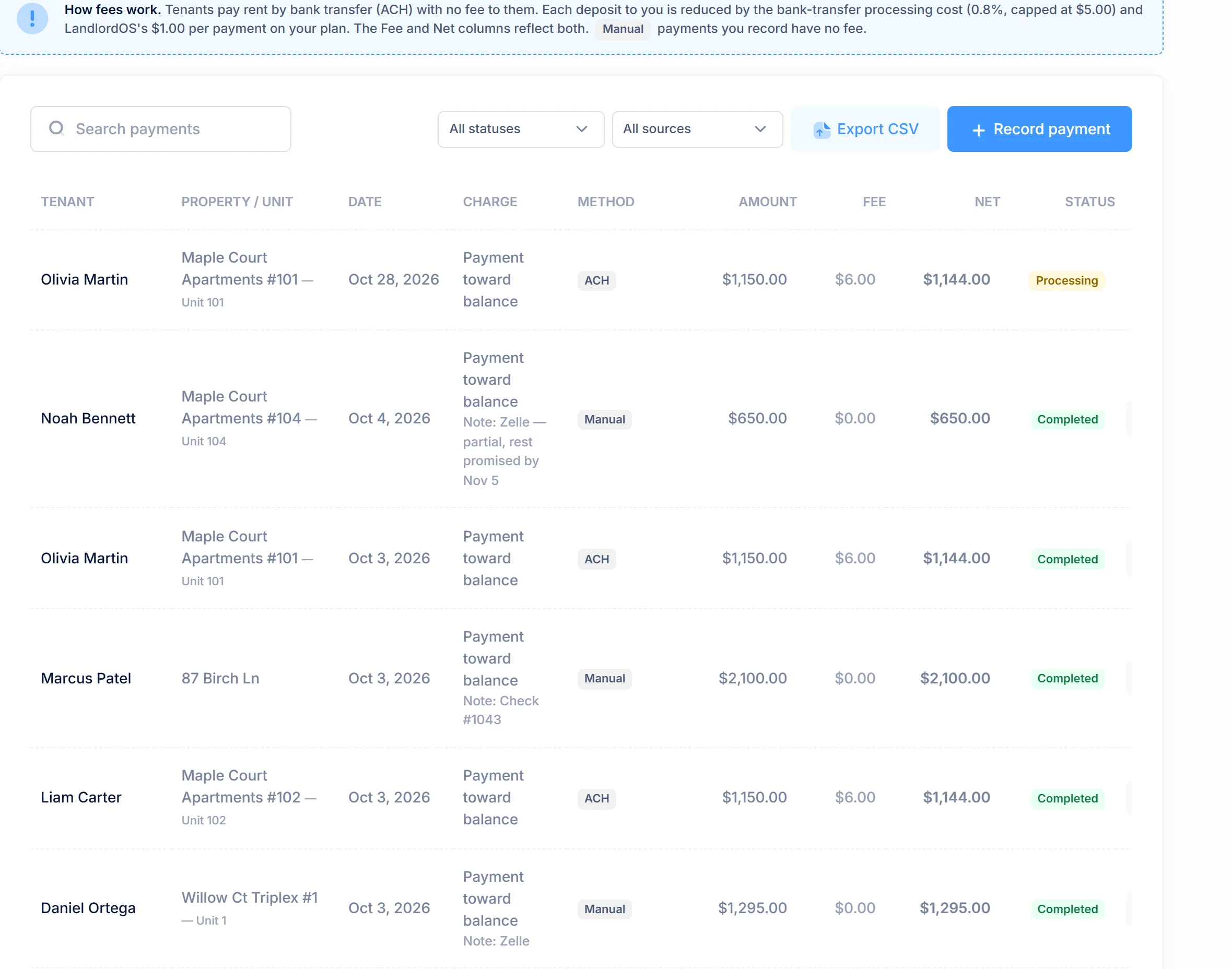
Cash, check, Zelle or a bank app: record them by hand, with no fee of any kind
Plans
Online rent and offline recording on every plan, from $10/mo. Tenant Ledger, Rent Roll and Delinquency reports start on Standard

01 / Paying rent

How do tenants pay rent online in LandlordOS?

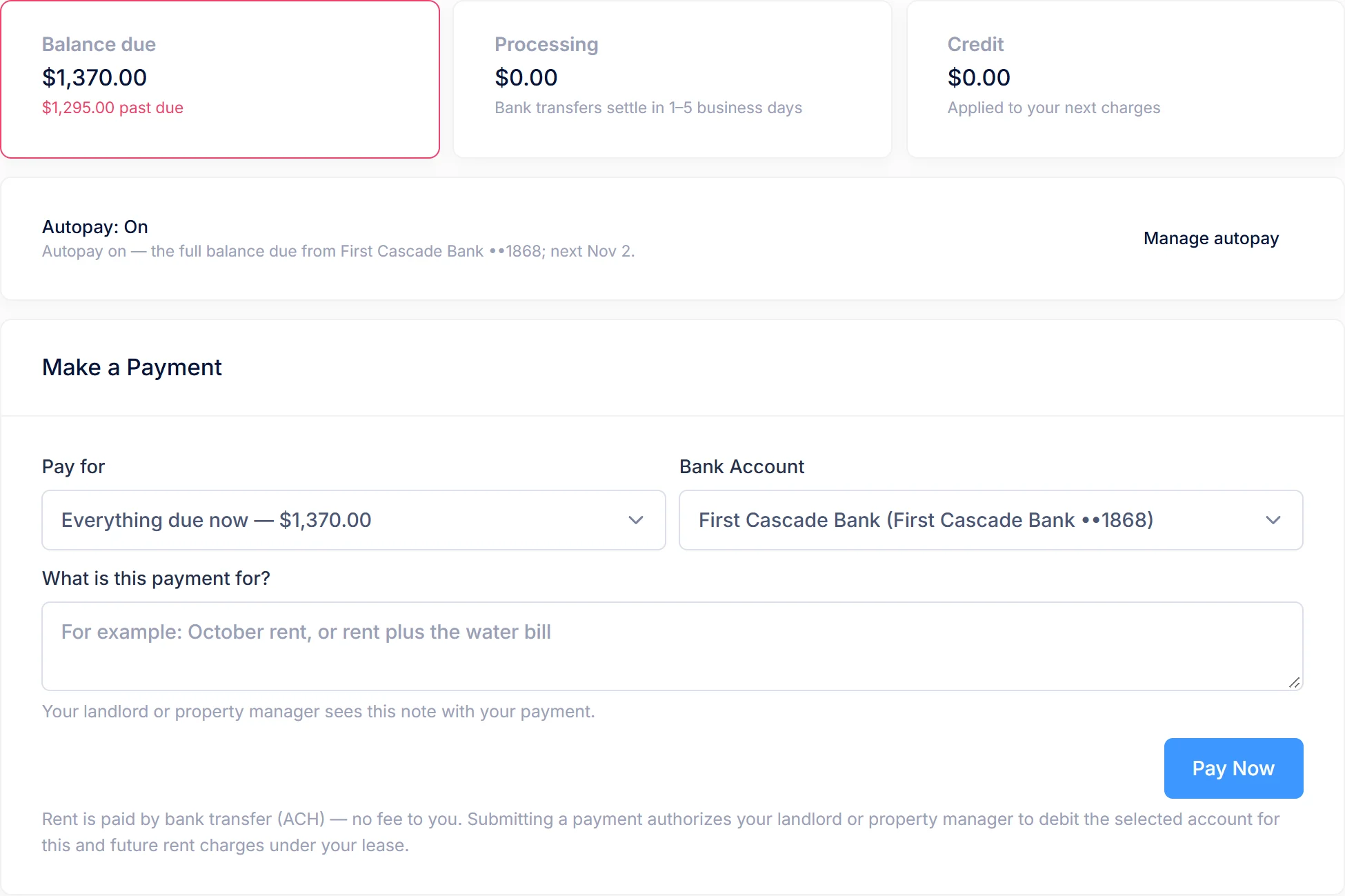
Tenants pay from their tenant portal by bank transfer (ACH). You invite each tenant to the portal by email. Once your payout account is connected, they link a bank account through Stripe's instant verification, so there's no wait for micro-deposits, and pay from the Payments page.

The portal shows the balance due, what's past due, payments still processing and any credit. A tenant can pay the full balance, a specific charge, or another amount: at least $5, and no more than what they owe plus one month's rent. Each payment carries a short note that you see on your side.

  • Balance, past-due amount and processing payments on the tenant's dashboard
  • Saved bank accounts the tenant can add or remove
  • An email receipt when a payment is submitted, and an email if the bank returns it
  • Autopay, which the tenant turns on in the portal for the full balance or a fixed monthly amount, with an email notice before each debit
  • Payment links you email for a charge, the balance, move-in costs, an application fee or a holding deposit, paid without a portal login
  • Every online payment listed on your Payments page, filterable by status and source

Example LandlordOS tenant portal Payments page: $1,250 balance due, nothing processing, a verified checking account linked, and a button to pay August rent.

02 / Fees

What does online rent collection cost?

The tenant is charged exactly the rent. The landlord's payout covers two things: Stripe's ACH processing cost, which is 0.8% of the payment capped at $5.00 and passed through with no markup, and a flat LandlordOS fee per payment that gets cheaper on higher plans. The cap means any payment of $625 or more costs $5.00 in Stripe fees. Your LandlordOS subscription costs the same whether or not you collect rent online, and recording offline payments is free.

LandlordOS rent payment costs by plan
PlanSubscriptionLandlordOS fee per paymentStripe ACH costMost you pay per payment
Starter$10/mo$2.000.8%, max $5.00$7.00
Standard$25/mo$1.500.8%, max $5.00$6.50
Premium$35/mo$1.000.8%, max $5.00$6.00
Offline / recorded by hand—NoneNone$0.00

Managing rentals for other owners? The property-management editions carry their own per-payment fee: $1.50 on PM Core, $1.00 on PM Trust and $0.50 on PM Advanced. See LandlordOS for Property Managers.

Worked example: two rents, three plans

  1. $1,400 rent. 0.8% is $11.20, so the Stripe cost hits the $5.00 cap.
  2. Add the LandlordOS fee. On Starter you receive $1,400 − $5.00 − $2.00 = $1,393.00. On Standard, $1,393.50. On Premium, $1,394.00.
  3. $500 rent. 0.8% is $4.00, under the cap, so the Stripe cost is $4.00.
  4. Add the LandlordOS fee. On Starter you receive $500 − $4.00 − $2.00 = $494.00. On Standard, $494.50. On Premium, $495.00.
  5. The tenant pays $1,400 or $500 in every case. Nothing is added on their side.

03 / Payouts

When does rent reach my bank account?

An ACH payment usually takes 1–5 business days to clear. While it clears, LandlordOS shows it as processing, and a payment that's processing isn't treated as late. Once it clears, Stripe pays it out to your bank on your account's payout schedule, which you can see and change inside LandlordOS.

You set up the payout account inside LandlordOS through Stripe's onboarding: no separate Stripe login and no setup fee. The money is paid straight to your connected account, not held by LandlordOS. The same page shows your balance, payouts and payments, and lets you handle refunds and disputes. Only your organization's owner can connect or change the payout account.

Rent deposits, step by step

Set up
Connect a payout account once, inside LandlordOS, through Stripe's onboarding
Tenant pays
From the portal, by autopay or through a payment link, by ACH from a verified bank account
Clearing
1–5 business days. The ledger shows the payment as processing until it clears
Payout
Stripe pays out to your bank on your payout schedule, which you can view and edit in LandlordOS
If it fails
The payment is marked failed, the tenant is told, and it stops covering the charge

04 / Offline payments

How do I record cash, check or Zelle payments?

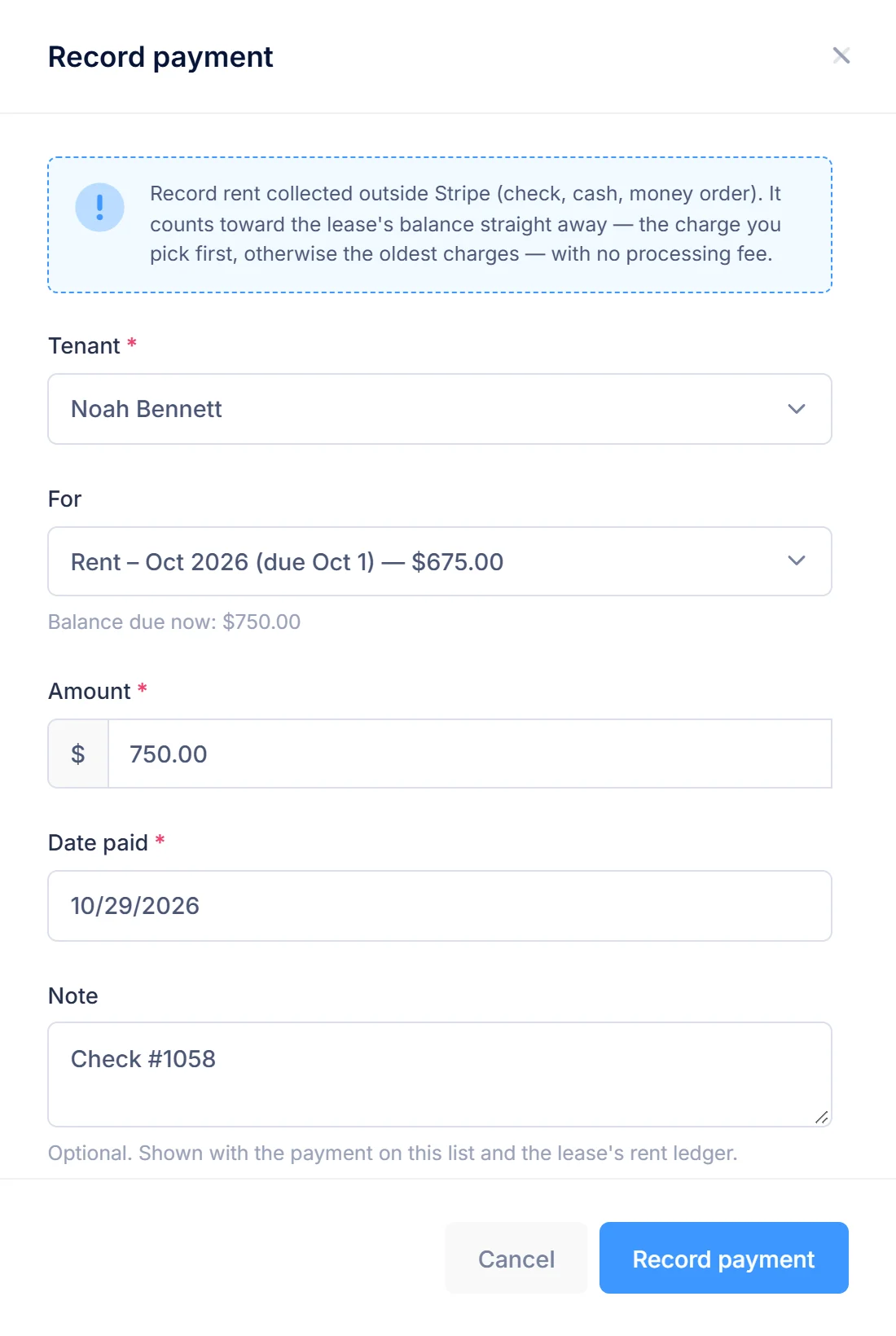
You add them on the Payments page: pick the tenant, enter the amount and the date it was paid, and optionally the charge it pays and a note such as a check number. LandlordOS applies it to the lease ledger like any other payment, and there's no fee. You can delete a payment you recorded by hand if you made a mistake.

If a security deposit, first month's rent or prepaid rent was collected before you started using LandlordOS, mark it collected on the lease so the tenant isn't asked to pay it again. You can also mark a lease as having its rent collected outside LandlordOS.

Example payment recorded by hand: $1,100 paid July 3 by Tom K. at Riverside 3A, applied to July rent, with the note "Check #1042".

05 / Ledger & late fees

How does the rent ledger work?

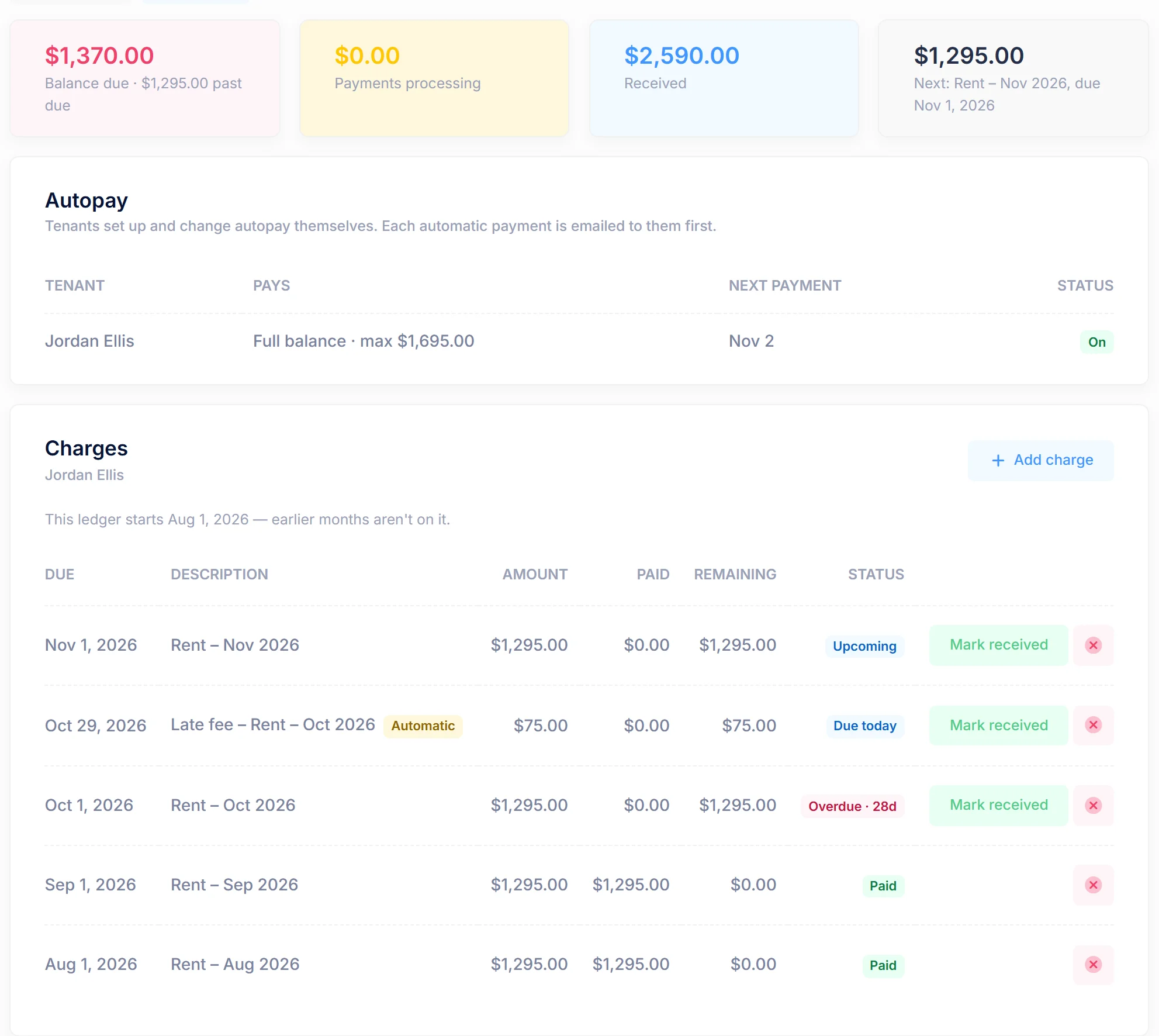
Every lease has its own ledger, on every plan. LandlordOS creates the charges from the lease terms: rent on its due day, recurring and one-time fees, the security deposit and prepaid rent. A payment settles the charge it was made for first, then the oldest open charges. Only cleared payments count as paid; a processing payment covers its charge without counting, and a failed one counts for nothing. You can add, edit or void charges by hand.

The same balance feeds the tenant portal, your Payments page and every rent report. The Tenant Ledger report, Rent Roll and Delinquency report are on Standard and Premium; the Security Deposit Ledger is on Premium. See LandlordOS accounting and reports.

Example lease ledger: July rent paid, a July late fee added after the grace period, and August rent covered by a bank transfer that is still processing.

Late fees & returns

Late fees and returned payments

Each lease sets its own late fee and grace days. Switch on automatic late fees and LandlordOS adds the fee to the ledger once, when rent is still unpaid after the grace period. A payment that's processing counts as paid, and you can void any late fee. You can also set a returned-payment fee of up to $500, added when a tenant's bank returns an online payment (not when the tenant reports the debit as unauthorized). Check your state's limits on both.
Reminders

What needs your attention

The Reminders page and the dashboard flag rent unpaid past the grace period, online payments that failed or were returned, move-in costs that haven't cleared before a lease starts, and a payout account that isn't set up yet. Each item stays until it's resolved or you dismiss it. LandlordOS also emails tenants a few days before rent is due (3 by default, on every plan), can send them a courtesy notice when rent is late, and sends your team a daily or weekly digest.

Inside LandlordOS

See it in the app.

Real LandlordOS screens, with demo data loaded.

Real LandlordOS screens with demo data; names and figures are made up.

Honest limits

What LandlordOS rent collection doesn't do (yet)

Not yet

Card payments

No card payments. Rent is collected by ACH bank transfer only.

By design

Autopay is the tenant’s choice

Tenants turn autopay on in their portal. You can’t enroll a tenant for them, and autopay pauses after two payments in a row are returned for insufficient funds.

Not included

Cash at retail locations

No cash payments at retail locations. Cash and checks are recorded by hand.

By design

Fees on refunds

Refunds don't return the Stripe ACH cost or the LandlordOS fee for that payment.

FAQ

Rent collection questions landlords ask

From the blog: ACH vs card for rent: what small landlords should know

Who pays the fee for online rent payments in LandlordOS?+

The landlord does. LandlordOS charges the tenant exactly the rent. The landlord's payout covers Stripe's ACH cost (0.8%, capped at $5.00) plus a flat LandlordOS fee of $2.00 on Starter, $1.50 on Standard or $1.00 on Premium, so the most a single payment costs is $6.00 to $7.00.

Can tenants pay rent by credit or debit card in LandlordOS?+

No. LandlordOS collects rent by ACH bank transfer only. Tenants link a bank account in the tenant portal through Stripe's instant verification. Cash, checks, Zelle and other payments made outside LandlordOS can be recorded by hand for free.

Do I need my own Stripe account to collect rent with LandlordOS?+

You set one up inside LandlordOS through Stripe's onboarding, with no separate Stripe login, setup fee or monthly minimum. Rent is paid into that account and out to your bank, and you see balances, payouts, refunds and disputes in LandlordOS.

How long does it take for rent to reach my bank account?+

An ACH payment in LandlordOS usually takes 1–5 business days to clear. After that, Stripe pays it out to your bank on your account's payout schedule, which you can view and change from the payments page in LandlordOS.

Does LandlordOS support autopay for rent?+

Yes. LandlordOS tenants can turn on autopay in the tenant portal, for the full balance due or a fixed amount each month (useful when co-tenants split the rent). Each debit is announced by email a few days ahead, and autopay pauses if two payments in a row are returned for insufficient funds. Tenants who prefer can still pay each charge by hand.

Can LandlordOS charge late fees automatically?+

Yes. Each LandlordOS lease has its own late fee amount and grace days. When automatic late fees are switched on, LandlordOS adds the fee to the lease ledger once rent is still unpaid after the grace period. A payment that's still processing counts as paid, and you can void any late fee.

Get started

Collect rent in LandlordOS.

Every plan includes online rent by ACH and free offline recording. Start with a 14-day free trial.