 LandlordOS
 HOAOS
HOAOS PraxiOS
Schedule E
Income and expenses by Schedule E category for the tax year, laid out three properties to a form (columns A–C), with each property's rental days. CSV and PDF export.
LandlordOS Accounting
LandlordOS is rental property accounting software that records income and expenses by property and Schedule E category. It reads bills you forward or photograph into draft transactions you approve, and builds Schedule E on every plan, P&L and Rent Roll from Standard, and a General Ledger and Balance Sheet on Premium.
Example LandlordOS transactions for Riverside Duplex in September: two rents, a water bill from the bill inbox, an AC repair from a maintenance request and a recurring mortgage payment, netting $1,428.50.
Key facts
01 / Transactions
Every dollar is a transaction with a property, a date, an amount, a name and a category. The categories follow Schedule E: Rents, Royalties and Other Income on the income side; Advertising, Auto & Travel, Cleaning & Maintenance, Commissions, Insurance, Legal & Other Professional Fees, Management Fees, Mortgage Interest Paid to Banks, Repairs, Supplies, Taxes, Utilities, Depreciation and others on the expense side.
Attach a receipt or document to any transaction. Set a recurring one, such as a mortgage payment, to repeat daily, weekly or monthly between two dates, and edit just one occurrence, this one and those after it, or the whole series. Filter the list by category, name, property and date range.
Ways transactions get in
Rent you collect is tracked on each lease's ledger, which drives the Tenant Ledger, the Delinquency report and the receivables on the Balance Sheet. It doesn't create income transactions by itself, so record rent income as transactions, or import it from your bank's CSV, for it to show on Schedule E and your P&L.
02 / Bill inbox Standard & Premium
Each property gets its own inbox address, plus one general address for your account. Forward a utility, insurance or contractor bill there, or upload one or take a photo of it on your phone, and LandlordOS reads it with OCR (optical character recognition) built for invoices and receipts. The bill lands in your bill history with what was read; nothing reaches your books until a person reviews it and clicks Create transaction.
If an email has no readable attachment, LandlordOS emails you to say so.
Example Create transaction form filled in from a City Water & Power bill: $342.00, invoice date July 28, due August 15, Utilities suggested, Riverside Duplex from the inbox address, waiting for you to confirm.
03 / Automation
LandlordOS reads and suggests; you decide. OCR extracts the fields from the bill, and the category suggestion comes from fixed rules that look for words like “water”, “insurance” or “HVAC” in the vendor name and line items. Both can be wrong, which is why every bill stops at a form you check.
04 / Reports
The report set grows with your plan. Most reports filter by year and by property, portfolio or rental type, and every one has Export CSV and Print buttons.
Income and expenses by Schedule E category for the tax year, laid out three properties to a form (columns A–C), with each property's rental days. CSV and PDF export.
Income against expenses for the year, from your transactions.
Every unit with its tenant, lease dates, rent and deposit, and each tenant's charges and payments from the lease ledger.
Who owes past-due rent, and which units sit empty and for how long.
Revenue per property, and categorized expenses by property, date range and vendor.
Every transaction by category, and a snapshot that includes rent receivables from the lease ledger.
Each lease's security deposit, its status and the balance held.
What you paid each vendor in the year, with the $600 threshold flagged and W-9s tracked. CSV export.
05 / Portfolios Premium
On Premium you can group properties into portfolios, for example one per LLC, and filter Schedule E, P&L and the other reports by portfolio. If you manage rentals for other owners, owner records, owner statements and trust accounting are part of LandlordOS for Property Managers, which is priced per door.
Plans
Starter covers the books and Schedule E. Standard adds bills, bill reading and the everyday reports. Premium adds the full report suite, portfolios and vendors.
| Feature | Starter$10/mo | Standard$25/mo | Premium$35/mo |
|---|---|---|---|
| Transactions, recurring entries and CSV import | Included | Included | Included |
| Schedule E | Included | Included | Included |
| Bill upload and storage | Not included | Included | Included |
| Bill inbox and automatic bill reading | Not included | Included | Included |
| P&L, Rent Roll, Net Cash Flow and Tenant Ledger | Not included | Included | Included |
| Delinquency and Vacancy reports | Not included | Included | Included |
| Line-item editing, duplicate warnings and bulk create | Not included | Not included | Included |
| Income Statement, Expense Report and Security Deposit Ledger | Not included | Not included | Included |
| General Ledger and Balance Sheet | Not included | Not included | Included |
| Portfolios, vendor management and 1099 report | Not included | Not included | Included |
Inside LandlordOS
Real LandlordOS screens, with demo data loaded.
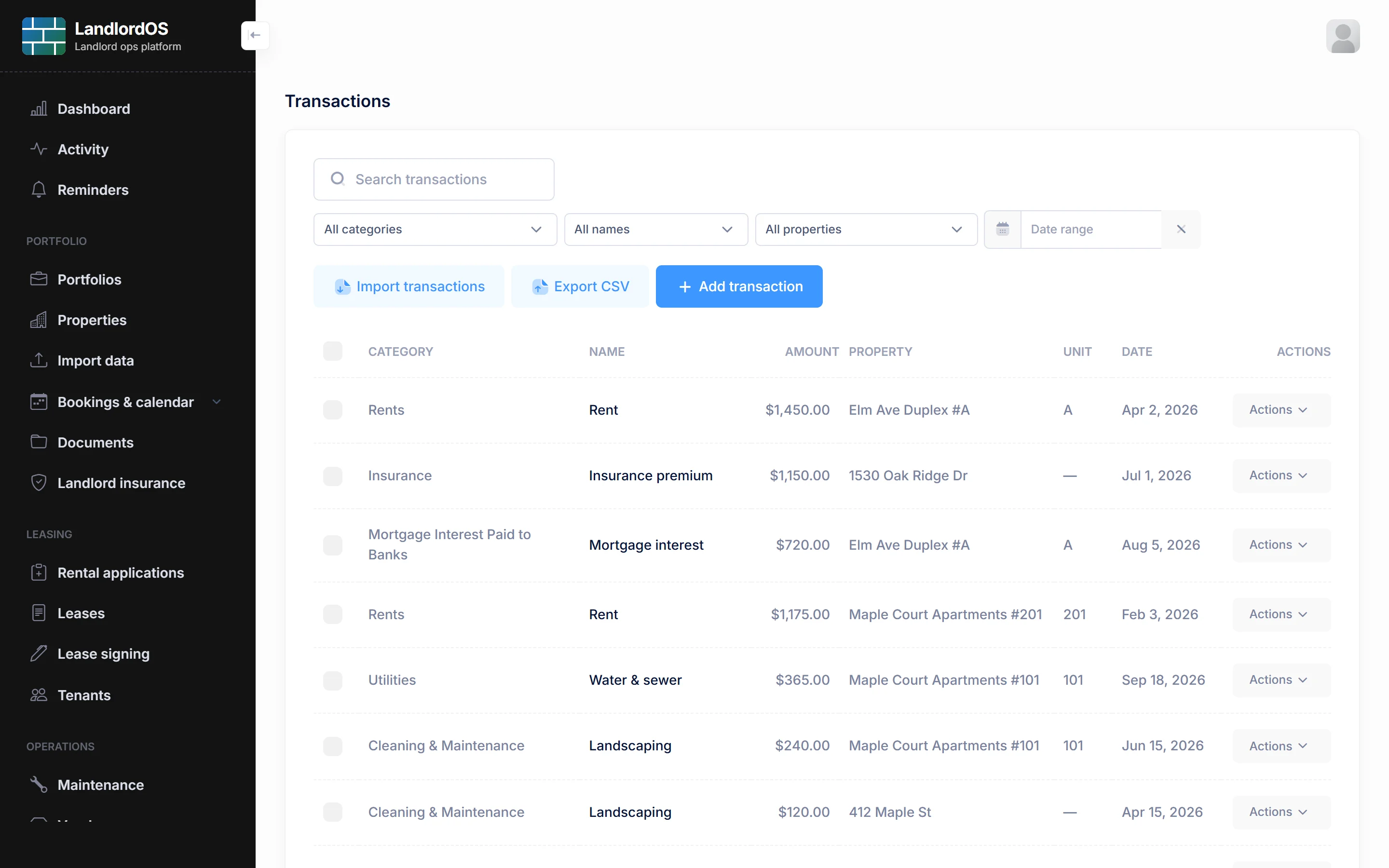
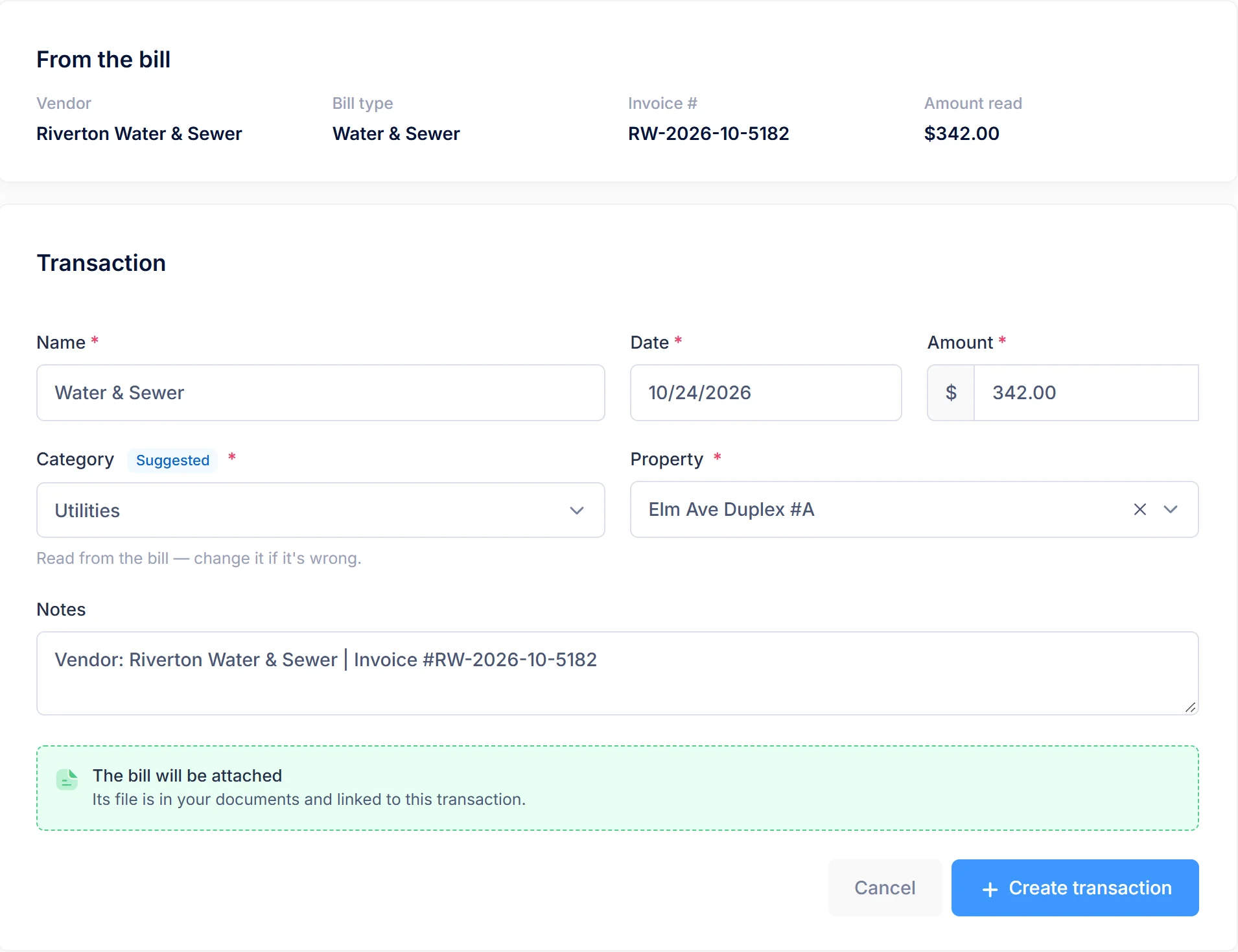
Real LandlordOS screens with demo data; names and figures are made up.
Limits
LandlordOS doesn't connect to your bank. There are no bank feeds; bring transactions in with a CSV export from your bank.
LandlordOS doesn't sync with QuickBooks or Xero. It imports a QuickBooks transaction CSV and exports reports to CSV, but nothing syncs both ways.
LandlordOS doesn't turn rent collected on a lease into income transactions automatically.
LandlordOS doesn't prepare or file your tax return. Schedule E gives you the figures; you or your accountant file.
FAQ
Yes, on every plan. LandlordOS builds Schedule E from your transactions for the tax year you choose, three properties to a form, with income and expenses by category and each property's rental days. You can export it to CSV or PDF or print it for your accountant.
LandlordOS reads bills with OCR built for invoices and receipts, and suggests a category using fixed keyword rules. It fills in a Create transaction form, but nothing is booked until you check the form and save it.
Yes. When you create a transaction from a bill in LandlordOS, you can split it across two or more properties. The shares must add up to the bill's total, and LandlordOS creates one transaction per property.
No. LandlordOS has no bank feeds today. You can import transactions from a CSV file, including a QuickBooks transaction export or an Airbnb payouts file, and add recurring transactions such as a mortgage payment.
Not yet. Rent collected through LandlordOS is recorded on each lease's ledger, which feeds the Tenant Ledger and Delinquency reports. The P&L and Schedule E are built from transactions, so rent income needs to be entered or imported as transactions.
The General Ledger, Balance Sheet, Income Statement, Expense Report and Security Deposit Ledger are on the LandlordOS Premium plan at $35 a month. Standard at $25 a month includes P&L, Rent Roll, Net Cash Flow, Tenant Ledger, Delinquency and Vacancy. Schedule E is on every plan.
Keep exploring LandlordOS
Get started
Import last year's transactions, forward a bill, and run Schedule E. Every plan has a 14-day free trial.