 PraxiOS
 LandlordOS
 HOAOS
HOAOSRuns the firm's account
- Everything a Manager can do
- Firm settings and the firm's PraxiOS subscription
- The full audit log
PraxiOS Security
PraxiOS keeps each firm's data separate, limits billing and client-portal controls to Managers and Admins, and gives clients hashed portal links that expire in 1 to 30 days instead of passwords. Sign-ins are protected with salted password hashes, strict cookies, forgery protection and rate limits, and key portal and checklist actions are written to an audit log.
Example PraxiOS client portal link for Delgado Properties: expires 14 days after creation, single-use, stored as a salted hash, and revocable by Managers and Admins.
Key facts
Data isolation
Every client, document, invoice and work item in PraxiOS is stamped with the firm it belongs to, and every query is filtered by that firm. PraxiOS works out your firm on the server from the signed-in user, not from anything in the page or the URL, so changing an ID in the address bar can't reach another firm's records.
Access
Signed-in members of your firm can see your firm's clients and their documents, and the client can see their own documents through their portal link. Nobody outside your firm can. Within the firm, PraxiOS uses three roles to decide who can change sensitive settings and see the money.
Teams group people for assignments, and a team's page is visible only to its members, Managers and Admins. Teams don't currently hide clients from other staff in the same firm.
Client portal
A PraxiOS portal link carries a long random token, and PraxiOS stores only a salted hash of it (PBKDF2 with SHA-256 and 100,000 iterations), so the link can't be read back out of the database. The full link is shown once, when a Manager or Admin creates it.
Sign-in & web protections
PraxiOS stores passwords only as salted PBKDF2 hashes, keeps sessions in cookies scripts can't read, and rate-limits the endpoints attackers target. Every form is protected against cross-site request forgery.
PBKDF2 with SHA-256, 100,000 iterations and a random salt per password. Reset links expire after 2 hours, and the reset form doesn't reveal whether an email has an account.
Session cookies are sent only over HTTPS, can't be read by page scripts, and aren't sent on requests started by other sites.
Login: 10 attempts per 5 minutes. Forgot password: 5 per 15 minutes. Sign-up: 5 per hour. Portal uploads: 20 per 5 minutes.
Anti-forgery tokens are validated on every form post. HTTPS is enforced with HSTS, and responses carry a content security policy and anti-framing and no-sniff headers.
PraxiOS keeps its cookie-signing keys on disk rather than in memory, so restarts and deployments don't sign everyone out or break a client's portal session part-way through.
Audit
PraxiOS writes an audit event, with who, what, when and which record, for the actions that matter most around client access and documents. Managers and Admins can review recent events in the audit report.
Separately, every record in PraxiOS carries a created and a last-updated timestamp that the system sets itself.
Inside PraxiOS
Real PraxiOS screens, with demo data loaded.
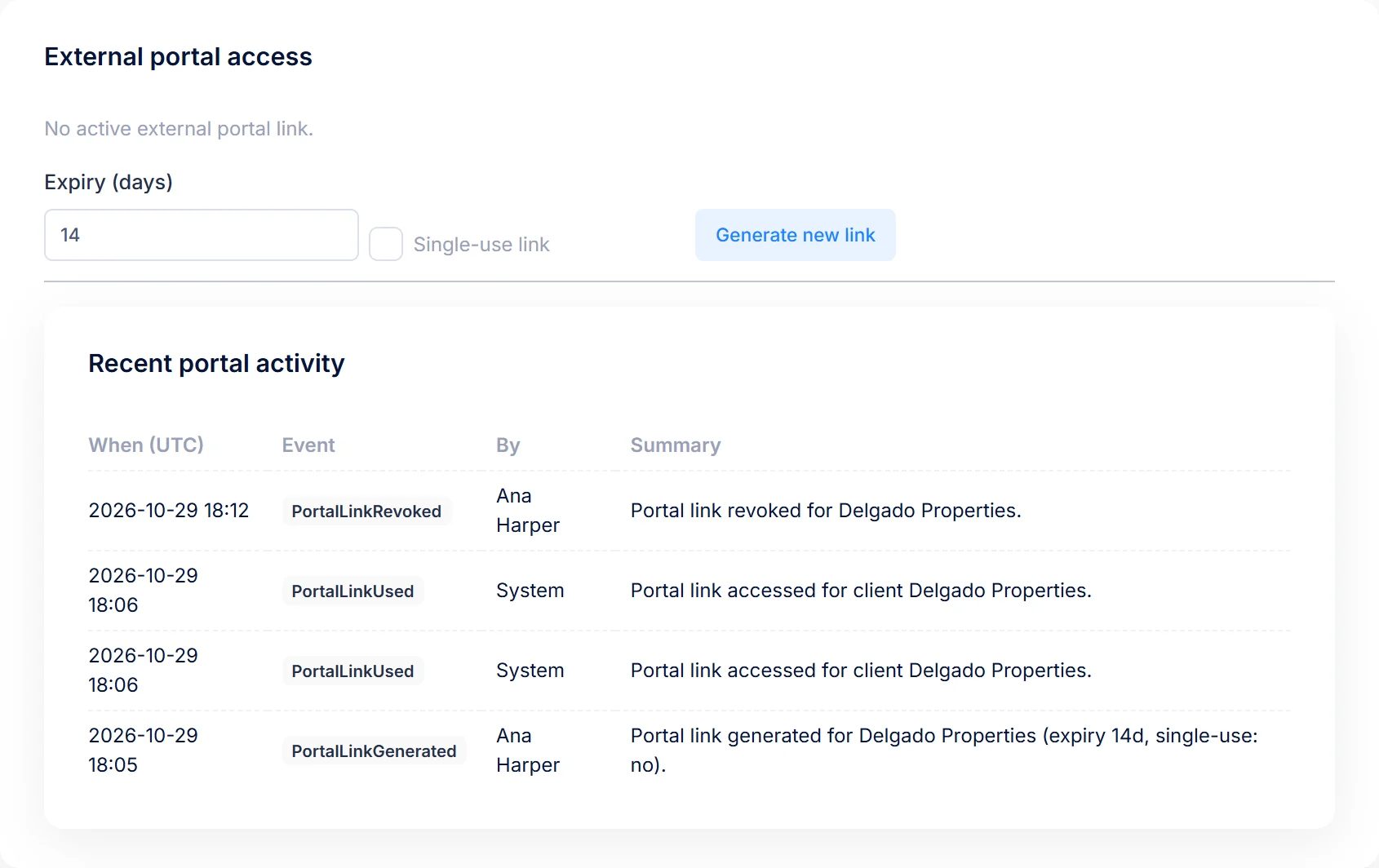
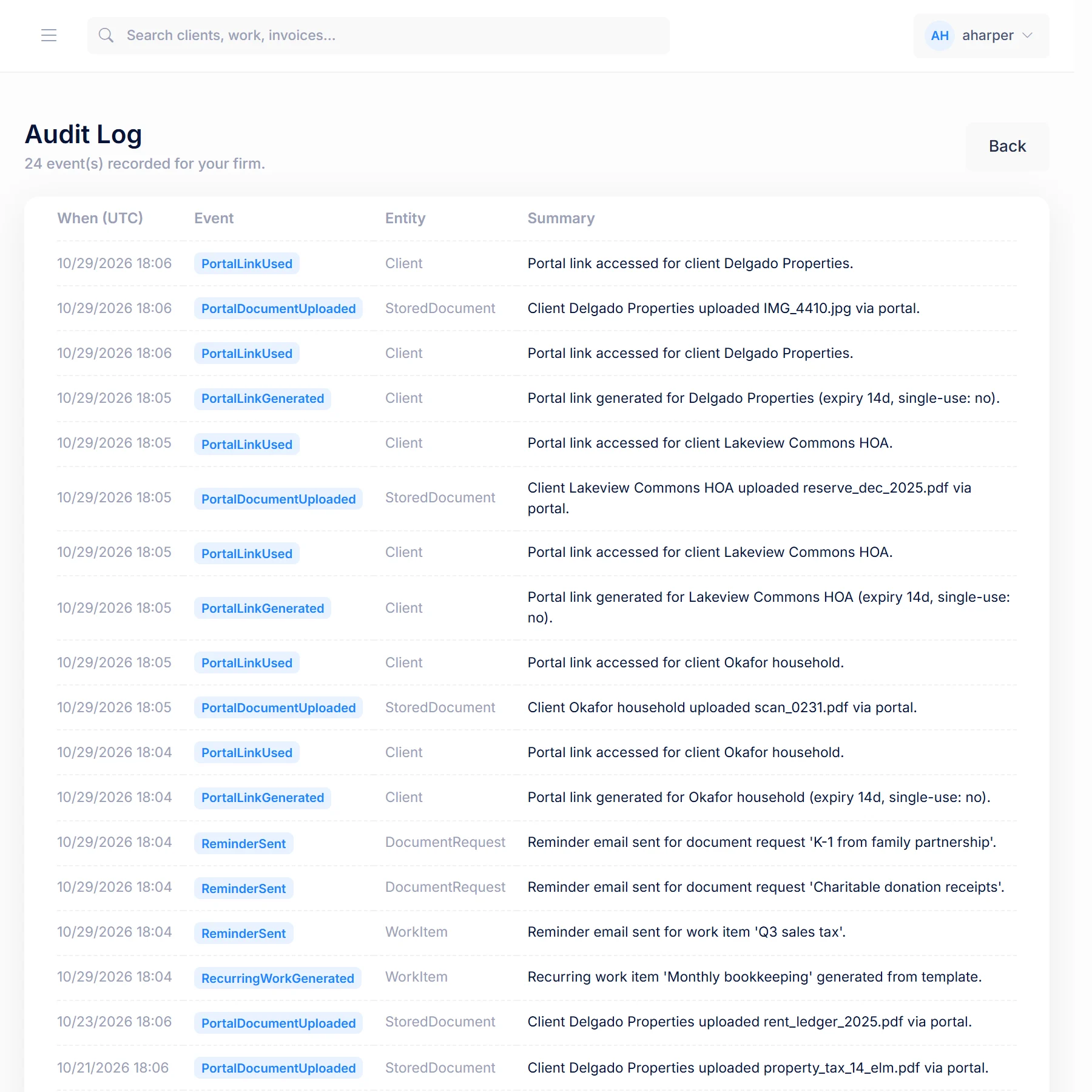
Real PraxiOS screens with demo data; names and figures are made up.
Straight answers
PraxiOS doesn't hold SOC 2, ISO 27001 or any other security certification today, and we don't list any. This page describes only controls built into the PraxiOS application. It doesn't make claims about hosting regions, backups, uptime or encryption beyond what's described above. PraxiOS doesn't offer two-factor authentication or single sign-on (SSO) yet; SSO is on the Enterprise roadmap. If your firm needs a security questionnaire answered, email us and we'll answer it plainly.
No SOC 2, ISO 27001 or other certification today.
Sign-in is email and password, with the protections described above.
On the PraxiOS Enterprise roadmap.
FAQ
No. PraxiOS doesn't hold SOC 2 or any other security certification today. DomoDomu describes only the controls built into the PraxiOS application and will answer security questionnaires on request at contact@domodomu.com.
No. PraxiOS sends each client a portal link instead. The link expires after 1 to 30 days, can be set to work only once, is stored only as a salted hash, and can be revoked or replaced by a Manager or Admin at any time.
Anyone with a PraxiOS portal link can open that client's portal until the link expires, is used (if single-use), or is revoked. For sensitive clients, use a single-use link with a short expiry, and revoke it from the client's page if it may have been shared.
No. In PraxiOS, invoices, payments, budgets and reports are limited to users with the Manager or Admin role. Staff can work on clients and documents without seeing billing.
Not yet. PraxiOS sign-in uses an email and password, protected by salted password hashes, strict cookies and a limit of 10 login attempts per 5 minutes. Single sign-on is on the PraxiOS Enterprise roadmap.
Keep exploring PraxiOS
Get started
Book a demo and bring your checklist. We'll show you the portal link settings, roles and audit log in the product.