 Engage
 LandlordOS
 HOAOS
 PropPay
 PraxiOS
 Books
 Field Service
 HCM
 ATS
 FormRelay
 AppOS
Engage Scope & realization
Scope creep and realization tracking for accounting firms.
Which clients cost more than they pay?
Give any service a scope limit, such as hours, transactions, bank accounts, entities or payroll employees a month, and Engage flags it when the work runs more than 10% over. From the flag it suggests a new limit and price and drafts a change order: re-price the service from now on, or bill the overage once. Nothing is billed until the client approves. Realization by service shows what you billed against the hours worked at your standard rate.
- Alerts at 10% over scope
- Change orders the client approves
- Realization by service
- A pricing calculator built on your hours
14 days free, no card needed · From $49/mo
Demo data
Key facts
- Scope limits
- Hours, transactions, bank accounts, entities or payroll employees a month, per service
- Alerts
- When actual work is more than 10% over the limit
- Change orders
- Re-price the service ongoing, or bill the overage once, after the client approves
- Realization
- Billed ÷ (hours × your standard rate, $175 by default), over 1 to 36 months
- Where the numbers come from
- Entered in Engage or sent through the API; PraxiOS and Books connections are coming
- Price
- Included in every plan, from $49/moEvery feature on every plan
Out-of-scope work
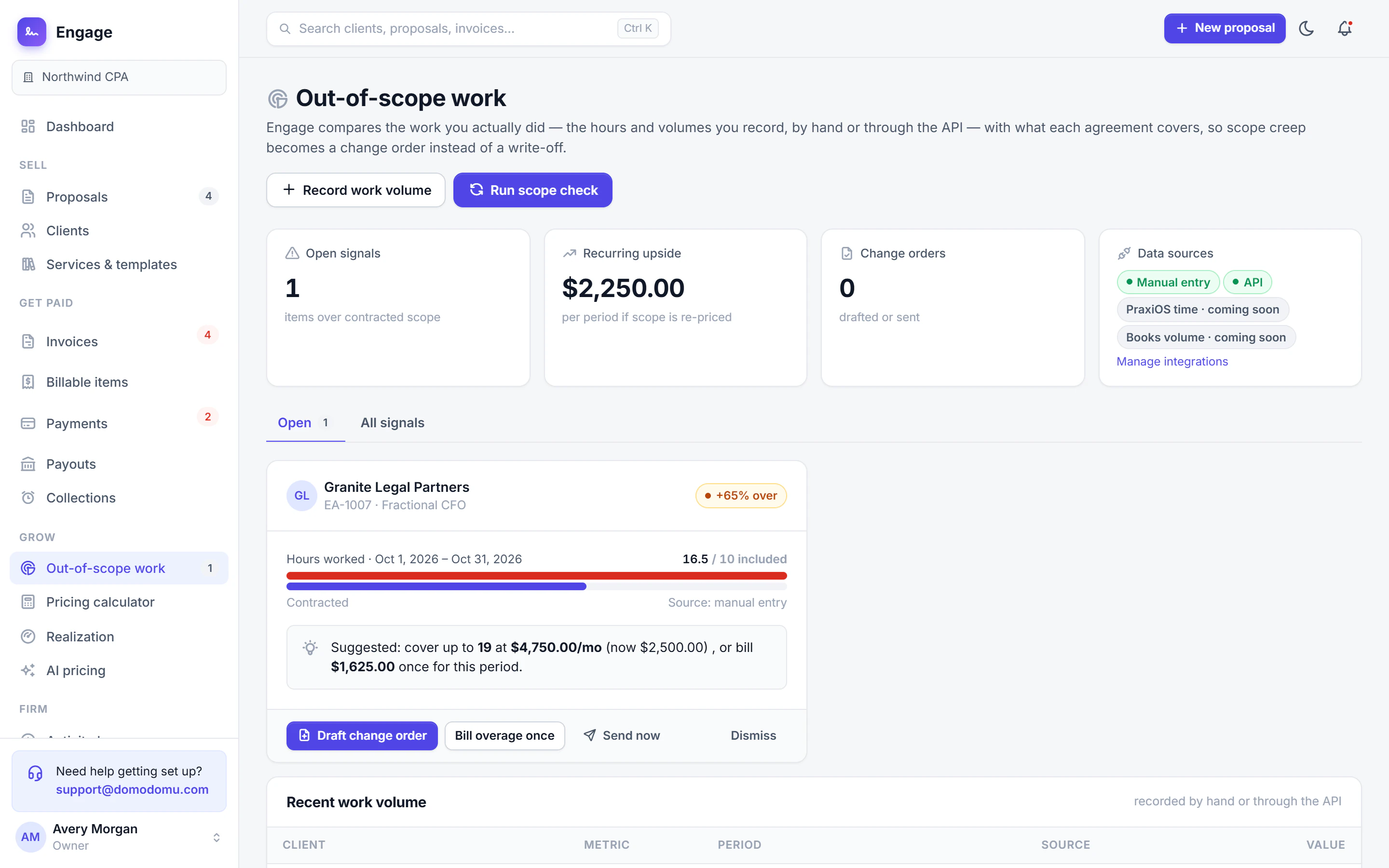
How does Engage catch scope creep?
- Set a limit on a service, such as 10 included hours a month on a Fractional CFO retainer.
- Record the actual work, in Engage or through the API.
- Engage flags it when the work is more than 10% over: here, 16.5 of 10 hours, 65% over.
- Send the change order Engage drafts, with a suggested new limit and price, or bill this month’s overage once. It’s billed only after the client approves. Or dismiss the flag.
Realization
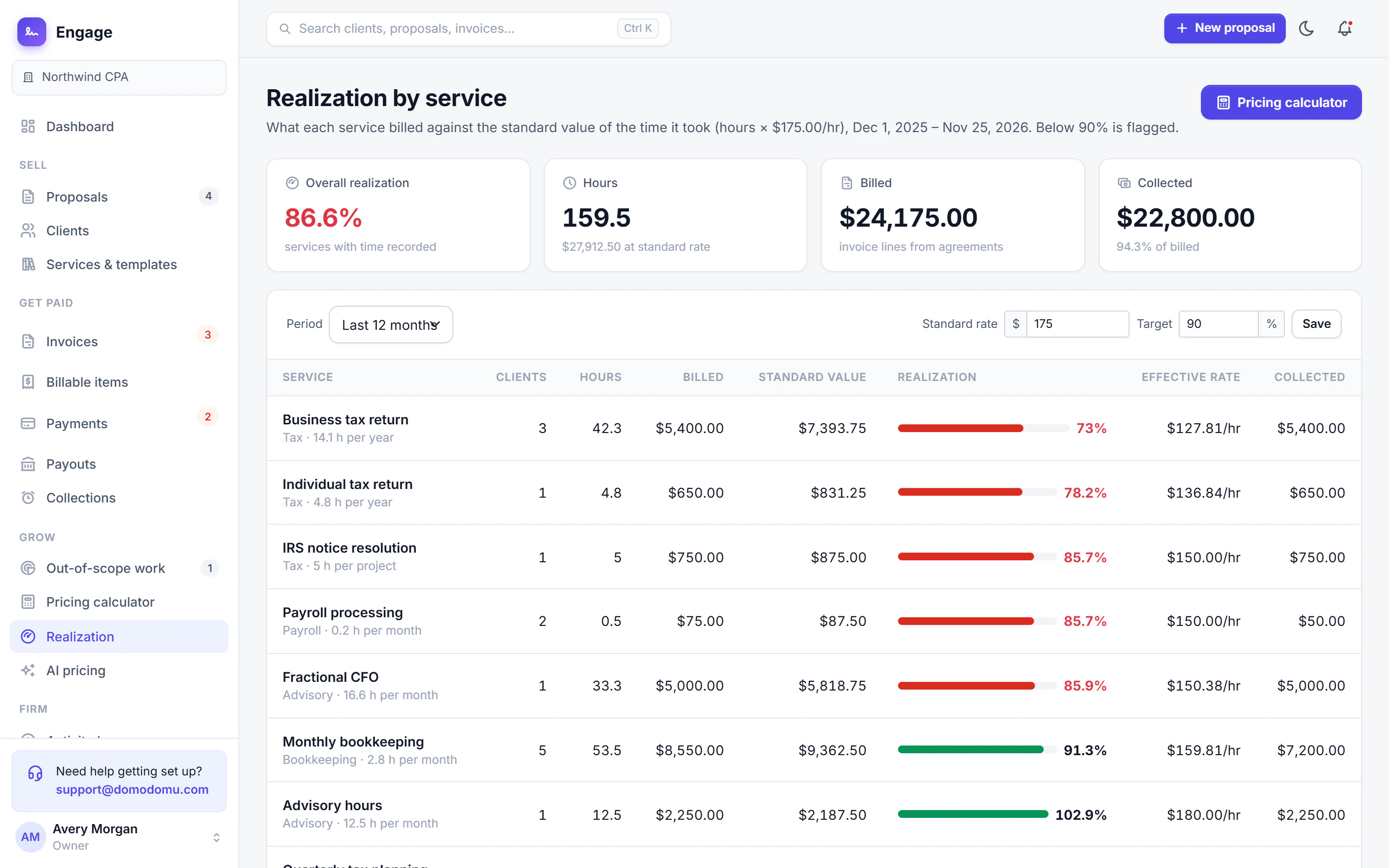
Which work bills less than its time?
Realization by service divides what you billed by the hours worked at your standard rate ($175 an hour unless you change it), with each service’s effective hourly rate and collection rate. Services under your target, 90% by default, are flagged. Pick any period from 1 to 36 months. Realization needs time recorded against each service, entered in Engage or sent through the API.
Pricing calculator
What should this work cost?
The pricing calculator starts each service from the hours your firm has actually averaged on it, adjusts for the client’s complexity, and shows the fee at your standard rate beside the realization at the price you choose. Turn the result into a draft proposal in one click. Engage can also suggest prices from a client’s volume, such as transactions, bank accounts and payroll employees, from figures you enter.
Inside Engage
See it in the app.
Real Engage screens, with demo data loaded. Click a screen to see it full size.
Real Engage screens with demo data; names and figures are made up.
Straight answers
What Engage doesn't do (yet).
If one of these is a must-have for your firm, it's better you hear it here than in week two.
- ComingHours and volume from PraxiOS and BooksEngage reads actual work from figures you enter or send through the API today. Automatic feeds from PraxiOS time and Books volume are coming.
- Not yetTime tracking inside EngageEngage doesn’t run a timer. Record hours on billable items or send them through the API.
How does Engage detect scope creep?+
Each service can carry a scope limit, such as hours, transactions, bank accounts, entities or payroll employees a month. When the recorded work is more than 10% over the limit, Engage flags it and drafts a change order with a suggested new limit and price.
Does a change order bill the client automatically?+
No. A change order is billed only after the client approves it. You choose whether it re-prices the service from now on or bills the overage once.
How does Engage calculate realization?+
Billed fees divided by the hours worked times your standard rate, which is $175 an hour unless you change it. It shows each service’s effective rate and collection rate and flags services under your target, 90% by default.
Where does Engage get hours and volume from?+
From figures entered in Engage or sent through the API’s work-metrics endpoint today. Automatic connections to PraxiOS time and Books volume are coming.
Keep exploring Engage
Get started
See which work pays.
Set scope limits on your fixed fees and let Engage tell you when a client outgrows them.
Switching from Ignition or Anchor? We’ll move your clients for you, free.