 FormRelay
 LandlordOS
 HOAOS
 PropPay
 PraxiOS
 Engage
 Books
 Field Service
 HCM
 ATS
 AppOS
Google Sheets
FormRelay creates a sheet in your Drive and adds a row for every submission, as plain text, never formulas.
FormRelay Integrations & API
Where else should leads go?
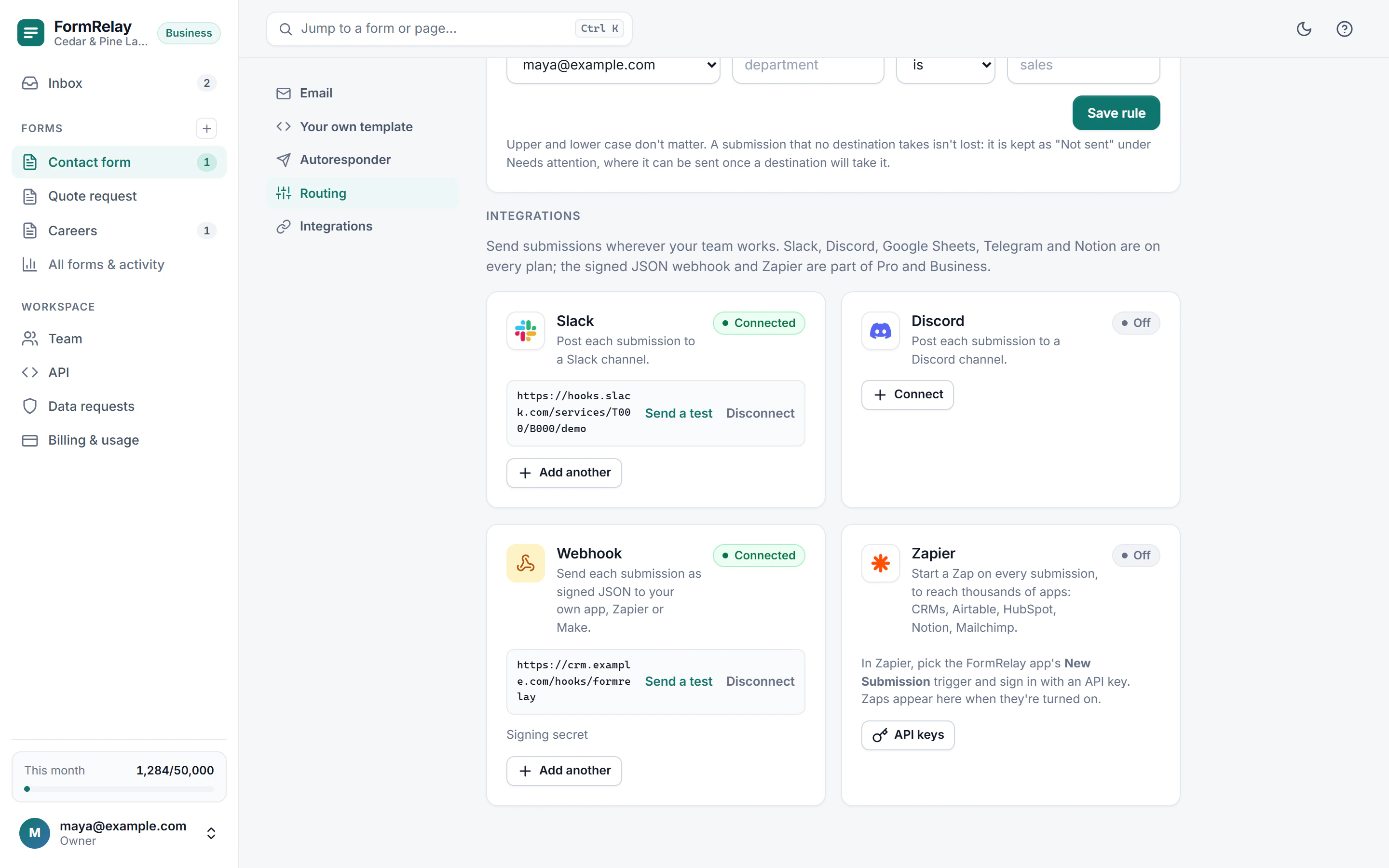
Besides email, each FormRelay form can post its submissions to Slack, Discord and your own server as signed JSON, up to five destinations per form. Each one is logged and retried, and can be tested and replayed. A read-only API and an MCP server let your own code, or an AI assistant, read what came in.
Slack and Discord on every plan; webhooks and the API on Pro and Business →
Demo data
Key facts
01 / Signed webhooks
Add your https address to a form and FormRelay posts each accepted submission to it as JSON: its id, the form, when it arrived, the site it came from, and every field. Each request carries a signature made with that webhook’s own secret, so your server can check it came from FormRelay and isn’t an old one replayed.
Any 2xx answer counts as delivered. Anything else is tried again a couple of minutes later, up to five attempts, each signed afresh. Send a test posts a sample to check your endpoint, and from a message in the inbox you can send one webhook delivery again. Make and other automation tools take the same JSON webhook.
02 / Slack and Discord
Yes. Paste a Slack incoming webhook or a Discord channel webhook into the form’s Delivery tab, and each submission is posted to that channel: which form it came from, then one line per field.
03 / API and MCP server
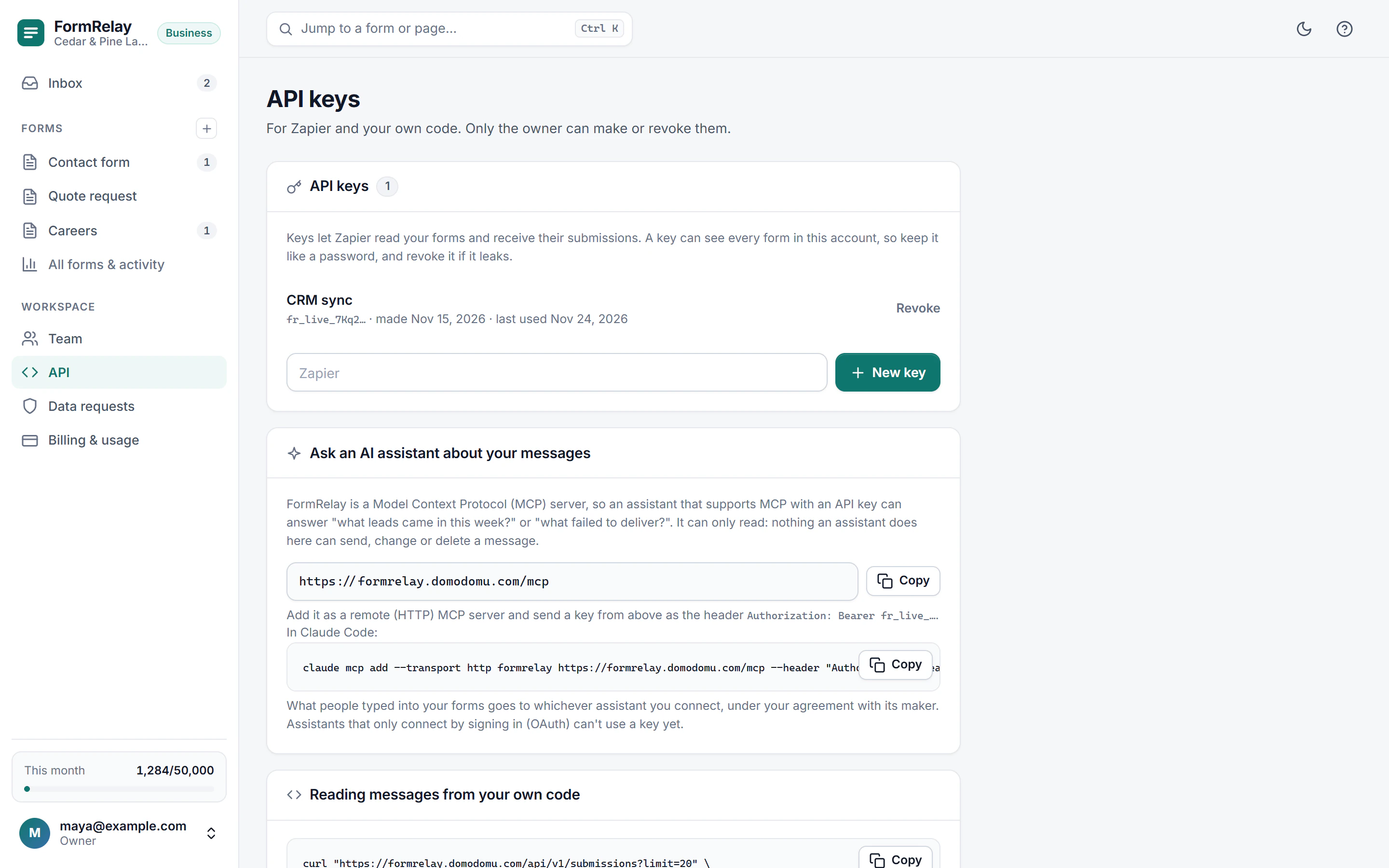
Yes. The workspace owner makes API keys in FormRelay, and your code reads the workspace’s forms and messages as JSON: newest first, in pages, by form, by folder or since a time, each with its labels, its delivery log and any files. The API only reads: nothing sends, changes or deletes a message.
The same keys open FormRelay’s MCP server, so an AI assistant that supports MCP, such as Claude, can answer “what leads came in this week?” or “what failed to deliver?”. Its four tools only read, too.
04 / Coming next
These are built and switch on once each provider’s approval is in place. The changelog will say when.
FormRelay creates a sheet in your Drive and adds a row for every submission, as plain text, never formulas.
A page in a Notion database, or a message in a Telegram chat or group, for every submission.
The FormRelay app in Zapier’s directory, with a New Submission trigger. Until then, Zapier’s own webhook trigger takes the JSON webhook.
Each request carries a signature header with a time and an HMAC-SHA256 of that time and the exact request body, made with the webhook’s own signing secret. Compute the same value from the raw body, compare, and check the time is recent. The docs have a worked example.
FormRelay tries again a couple of minutes later, up to five attempts in all. After that the delivery is marked failed and the submission waits under Needs attention, where Send again retries it. Delivery is at least once, so use the submission’s id to skip one you already have.
Yes, through the JSON webhook: add a Make custom webhook or Zapier’s webhook trigger as one of the form’s webhooks. A FormRelay app in Zapier’s directory is coming.
No. The API and the MCP server only read. Sending, labelling and deleting happen in the FormRelay app, by people on your team.
Slack and Discord are on every plan, including Free. Signed JSON webhooks, Zapier, the API and the MCP server are part of Pro ($12 a month) and Business, with no extra charge beyond the plan.
Keep exploring FormRelay
Get started
Sign up free, paste the snippet, and add Slack, Discord or your own webhook on the Delivery tab.