 FormRelay
 LandlordOS
 HOAOS
 PropPay
 PraxiOS
 Engage
 Books
 Field Service
 HCM
 ATS
 AppOS
FormRelay Spam protection
Contact form spam protection, without the busywork.
How do you stop form spam?
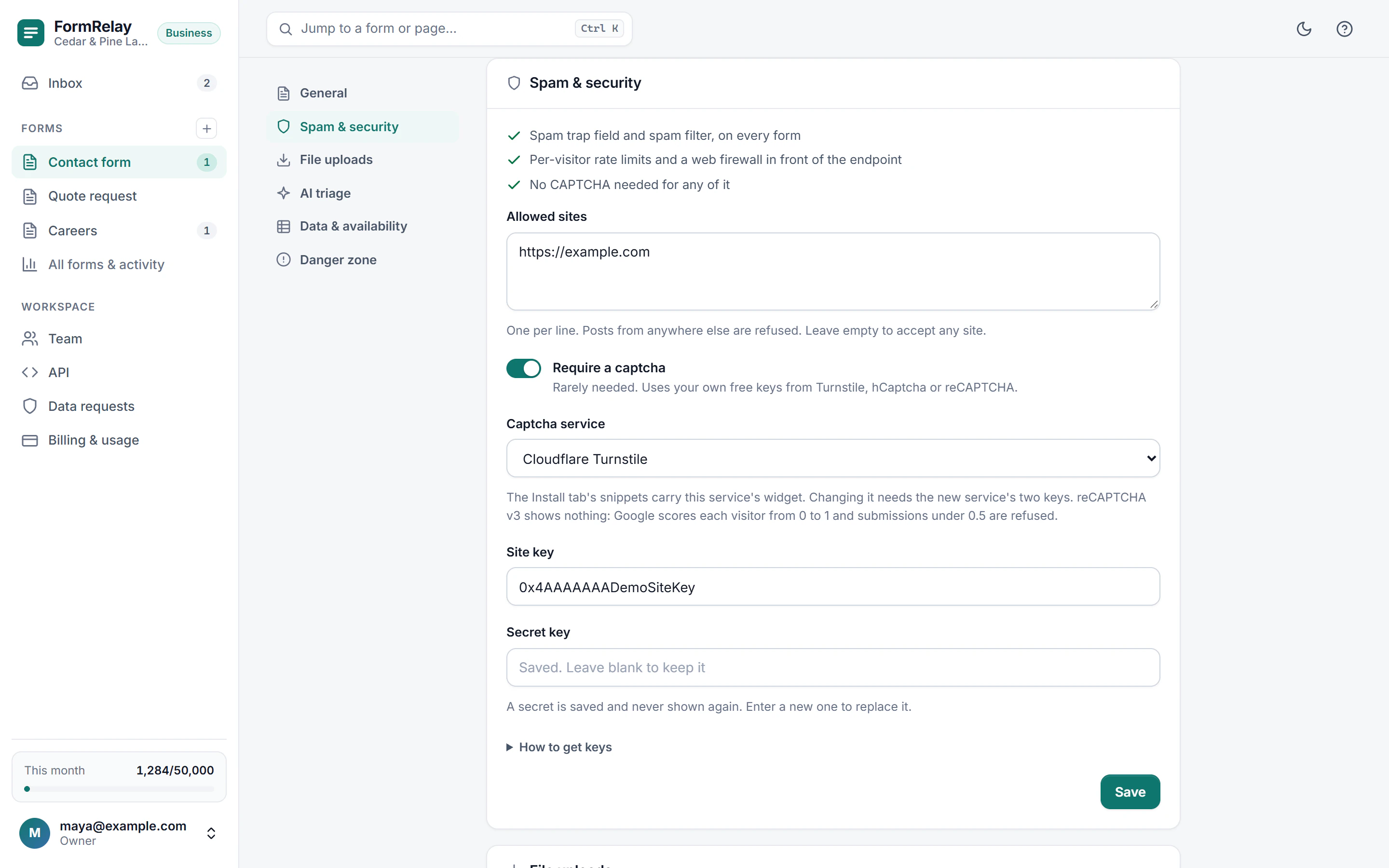
Every FormRelay form is protected by a hidden spam trap, a rate limit and a spam filter from the moment it’s made. Limit the form to your own site, and add Cloudflare Turnstile, hCaptcha or Google reCAPTCHA with your own keys if you want a captcha too. What gets caught is filed under Spam and never emailed.
- Works with no setup
- Captcha optional
- Mistakes one click to undo
Demo data
Key facts
- Spam trap
- A hidden fieldBots fill it in; people never see it. Those posts are dropped
- Rate limit
- Per visitorA person’s pace, so real visitors never meet it
- Spam filter
- On every formCaught messages go to the Spam folder, never to email or integrations
- Allowed sites
- Your own domainsPosts from any other site are refused
- Captchas
- Turnstile, hCaptcha, reCAPTCHAv2 checkbox or invisible v3, with your own keys
- Plans
- Every planIncluding Free
01 / Built in
Do I need a captcha to stop contact form spam?
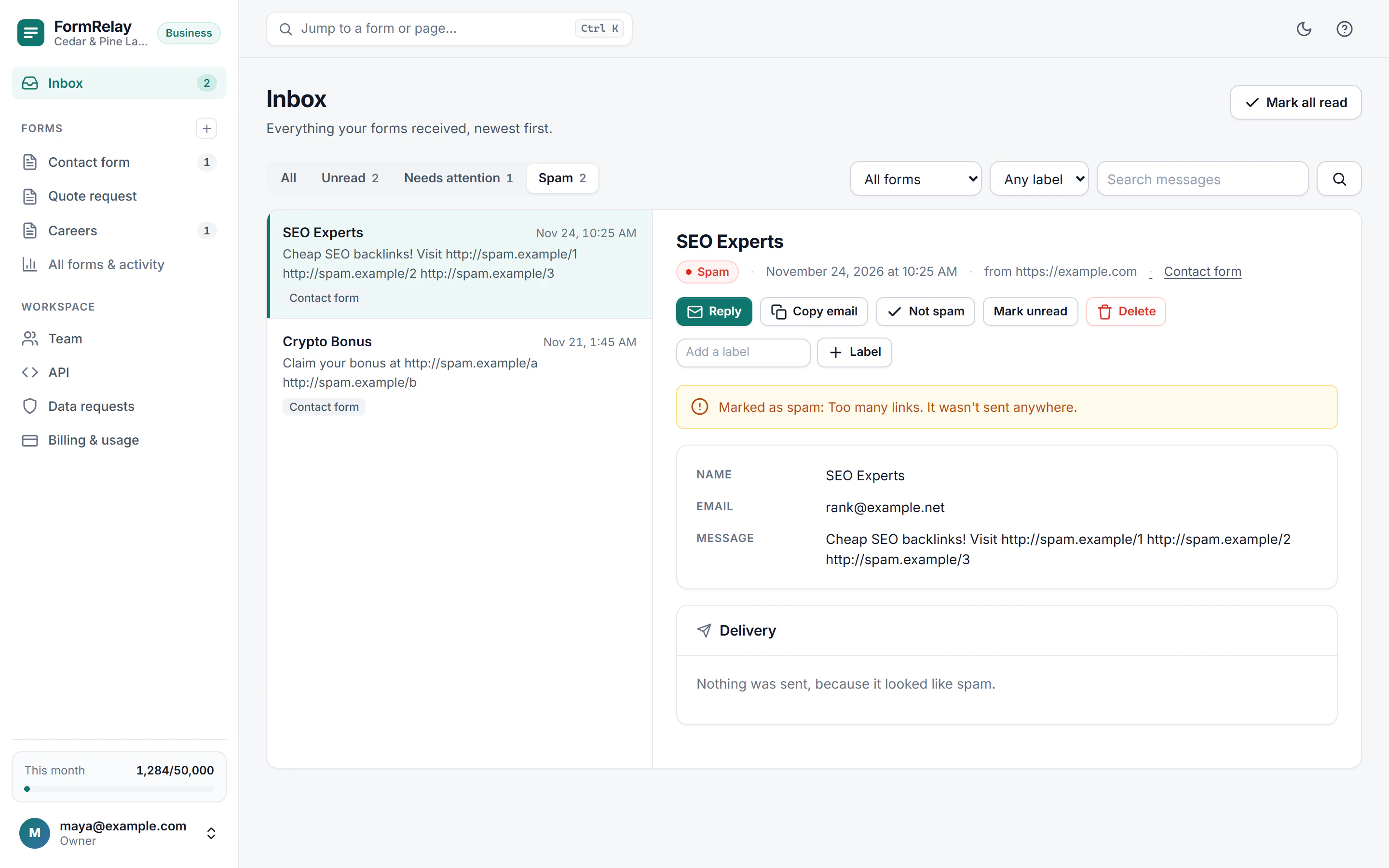
Most forms don’t. Three checks run on every form without any setup. A hidden checkbox named botcheck catches the bots that fill in every field they find: those posts get a normal answer and nothing is kept or sent. A rate limit stops one visitor from flooding the form. And a spam filter checks what’s left, such as a message stuffed with links.
Whatever the filter catches goes to the Spam folder. It’s never emailed or sent to Slack, Discord or a webhook. If it got one wrong, open the message and choose Not spam: it moves to the inbox and is delivered like any other.
- The spam trap is already in the setup page’s snippets
- Spam is never forwarded anywhere
- Not spam delivers a message caught by mistake
02 / Allowed sites
How do I stop other websites posting to my form?
A form’s access key sits in your page, so anyone can see it. Once your form is live, list the sites allowed to post to it, such as https://example.com. A post from any other site is refused before it’s counted or kept.
The same list decides which thank-you pages a form will send visitors on to, so nobody can use your form to redirect people to their own site. Changes apply within about a minute.
03 / Captchas
Which captchas does FormRelay support?
Turn on “Require a captcha” for a form and enter the site key and secret key from your own account with one of these services. The form then refuses every submission without a valid token, and the setup page’s snippets include the widget with your site key.
| Service | What the visitor sees |
|---|---|
| Cloudflare Turnstile | A small widget that usually needs no interaction |
| hCaptcha | A checkbox, sometimes followed by a challenge |
| Google reCAPTCHA v2 | The “I’m not a robot” checkbox |
| Google reCAPTCHA v3 | Nothing: Google scores each visitor, and a score under 0.5 is refused |
The secret key stays with FormRelay and is never shown again after you save it. A captcha service sees your visitors’ IP addresses, so mention it in your site’s privacy notice.
Does spam count toward my FormRelay limit?+
Submissions the spam filter catches count, because they’re accepted before they’re checked. Posts dropped by the spam trap, refused because they came from a site that isn’t allowed, or stopped by the captcha don’t count: they’re turned away before the monthly count.
What is a honeypot field?+
A form field people never see, hidden from view and from the keyboard. Many bots fill in every field they find, so a submission with anything in it is a bot. FormRelay’s is a checkbox named botcheck, and the snippets on the setup page include it.
Can I use reCAPTCHA v3 with FormRelay?+
Yes. Choose reCAPTCHA v3 and enter your own keys. Your page asks Google for a token when the form is sent, and FormRelay refuses any submission Google scores under 0.5.
What if FormRelay marks a real message as spam?+
Open it in the Spam folder and choose Not spam. It moves to the inbox and goes to every email address and integration the form would normally send it to.
Keep exploring FormRelay
Get started
Real leads in.
Spam out.
Every form is protected from the moment you make it. Free for 250 submissions a month.