 HOAOS
HOAOS LandlordOS
 PraxiOS
HOAOS Meetings & voting
HOA meeting and voting software,
from agenda to certified result.
HOAOS is HOA meeting and voting software for association boards, included on every plan. Boards schedule meetings with an agenda, record attendance against quorum, publish approved minutes, and run secret owner elections that units vote in online, by proxy or on paper. HOAOS also covers community ballots, surveys, announcements and the document library.
- Included on every plan
- Secret owner elections
- Online, proxy & paper
Example HOAOS owner election: 41 of 64 units have voted and the 50% quorum is met; 33 voted online, 5 by proxy and 3 on paper ballots recorded by the board.
Key facts
- Who it's for
- HOA and condo association boards, property managers working for them, and the owners and residents who vote.
- Meetings
- Agenda with reordering, attendance by unit, a quorum threshold, Yes / No / Abstain votes per agenda item, and minutes approved before residents see them.
- Voting
- Secret owner elections (one vote per unit, online, by proxy or on paper, quorum as a % of units, certificate) and community ballots (one vote per member).
- Surveys
- Non-binding: yes/no, multiple choice, 1–5 ratings and written answers, anonymous if you choose, with CSV export.
- Plans
- From $50/moIncluded on every HOAOS plan: $50/mo up to 50 units, $95/mo up to 200, $195/mo up to 500.
- Not included
- Video meeting hosting, weighted (percentage-interest) voting and automatic meeting notices.
01 / Meetings & agendas
How do you run an HOA meeting in HOAOS?
You schedule the meeting with a date, time, location and quorum, build the agenda, then open voting when the meeting starts. Agenda items can be added, moved up or down and removed until the meeting opens. Violation hearings can sit on a board meeting's agenda and link back to the violation.
The board records attendance by unit, and HOAOS shows how many units are present against the quorum you set. While voting is open, each unit's current owner can vote Yes, No or Abstain on every agenda item from their own account, and can change the vote until the board closes the meeting. Everyone sees the tally per item.
- Times entered and shown in your community's own time zone
- Attendance list of every active unit, ticked off by the board
- Quorum shown as met or not met as attendance is recorded
- One vote per unit per agenda item; tenants see the tally only
02 / Minutes
How do meeting minutes get to residents?
The board writes the minutes on the meeting's page in HOAOS, and they stay a board-only draft until approved. Saving a draft puts “Approve the minutes of …” on the next scheduled meeting's agenda, once. Approving publishes them as a Meeting Minutes document that residents read in the document library.
Revising published minutes starts a new draft. Residents keep seeing the published version until the board approves the revision.
- Draft, approve and publish from the meeting page
- Approval added to the next meeting's agenda for you
- Published minutes filed under Meeting Minutes in Documents
03 / Secret owner elections
How does secret ballot voting work in HOAOS?
An owner election gives each unit one vote, cast by a current owner. HOAOS stores that a unit voted (how, when and by whom) separately from what was chosen. The answers carry no voter and only the day they were cast, so nobody, including the board, can see how a unit voted.
Owners can vote online, give a general proxy (the holder votes as they choose) or a directed proxy (the owner picks the answers and the holder only submits them), or vote on paper for the board to record. Whichever way the unit votes, it votes once. An owner who votes themselves or withdraws cancels an unused proxy.
- Candidates with a statement under each name
- “Vote for up to N” for multi-seat elections
- Quorum as a percentage of eligible units, with turnout by method
- Top vote-getters elected, ties flagged, printable certificate
04 / Community ballots & surveys
What about quick votes and opinion surveys?
A community ballot gives every signed-in member one vote on yes/no or single-choice questions, with open and close times you set. Each answer is kept with the voter and a tamper-evident audit record (a SHA-256 hash), and the board certifies the result when it closes.
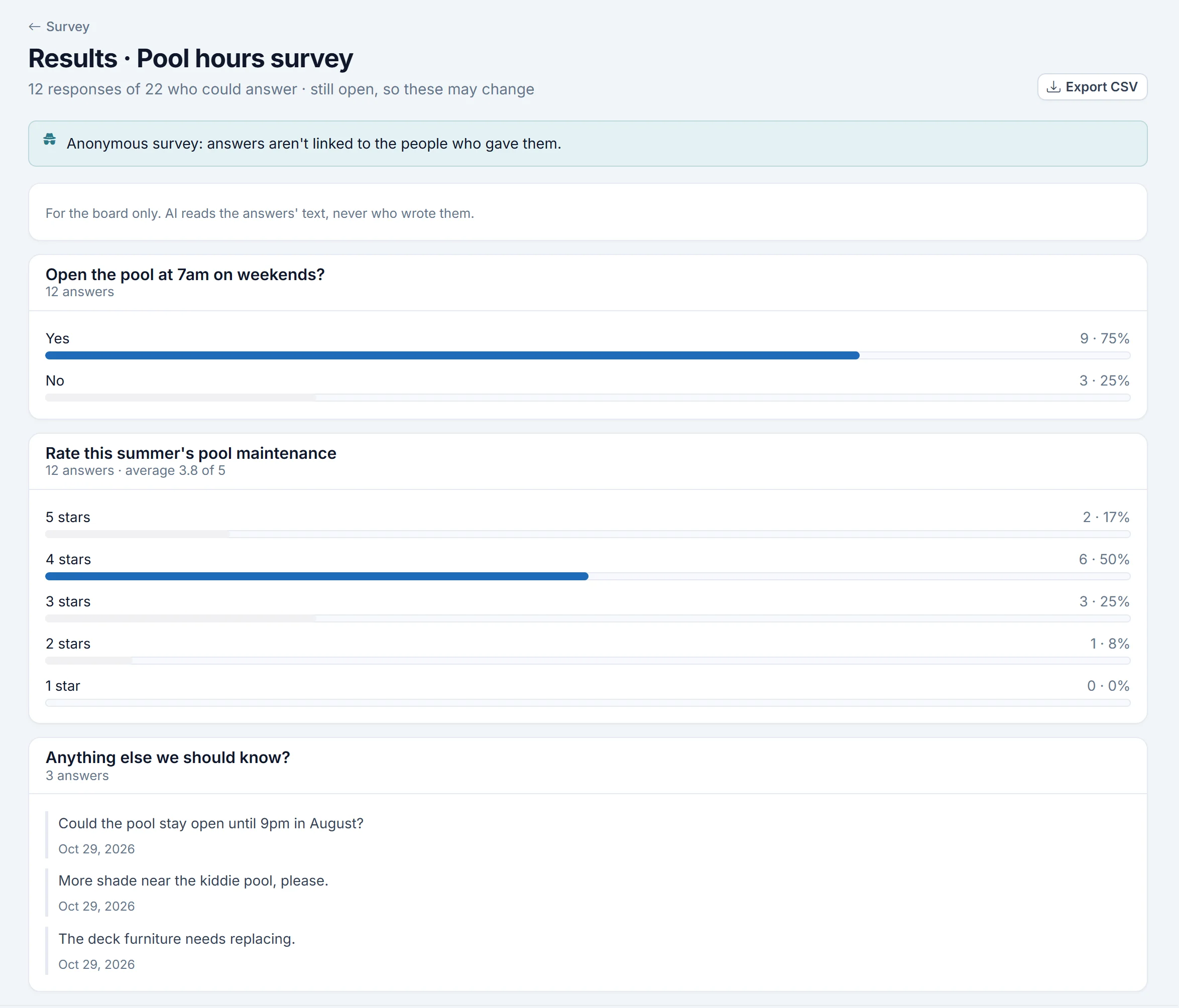
A survey is non-binding: nothing is certified. Ask yes/no, multiple-choice, 1–5 rating or written questions, send it to everyone or owners only, and make it anonymous if you like. You choose whether residents see totals as answers come in, after it closes, or never. Written answers are always board-only.
- Ballots open and close on schedule, in your time zone
- Anonymous surveys keep who answered apart from the answers
- Optional email to eligible residents when a survey opens
- Survey results as counts and averages, with CSV export
05 / Announcements & documents
How does the board tell everyone what was decided?
Post an announcement: publishing it emails the board and every current resident with an account, and it appears on their portal dashboard. For a one-off note, a mass message goes by email to all current residents, or just owners, tenants or the board.
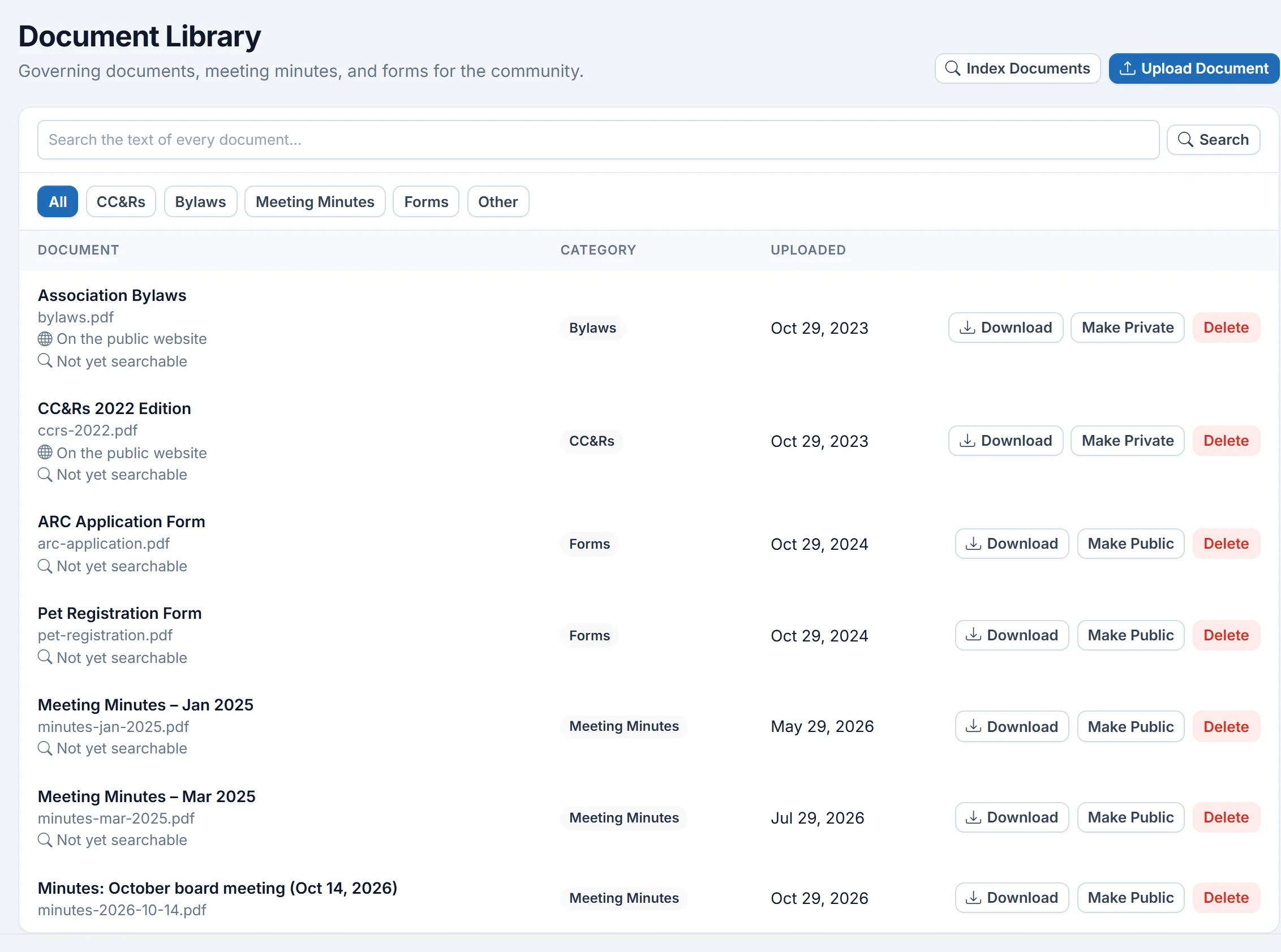
The document library holds CC&Rs, bylaws, meeting minutes, forms and other files. HOAOS reads the text of each upload, so the board can search every document's text and jump to the page. Residents browse and download by category. Any announcement or document can also be shown on your community's public website.
- Announcement emails on publish, kept in a feed residents can scroll
- Mass messages by audience, with a history of what was sent
- Documents filed by category, with full-text search for the board
- Optional public website for chosen announcements and documents
How it works
How to run a secret owner election in HOAOS.
An owner election in HOAOS takes five steps, and owners only take part in one of them.
- STEP 01
Create the election
On Ballots & Voting, choose Owner election, set when it opens and closes, and enter a quorum as a percentage of units.
- STEP 02
Add candidates
List each candidate with a short statement, and set how many seats owners may vote for.
- STEP 03
Owners vote
Each unit votes once: online, through a general or directed proxy, or on a paper ballot the board records.
- STEP 04
Watch turnout
The board sees how many units voted, and how, against the quorum. Never how any unit voted.
- STEP 05
Close and certify
When voting closes, residents see the results. The board certifies them and prints the certificate.
Inside HOAOS
See it in the app.
Real HOAOS screens, with demo data loaded.
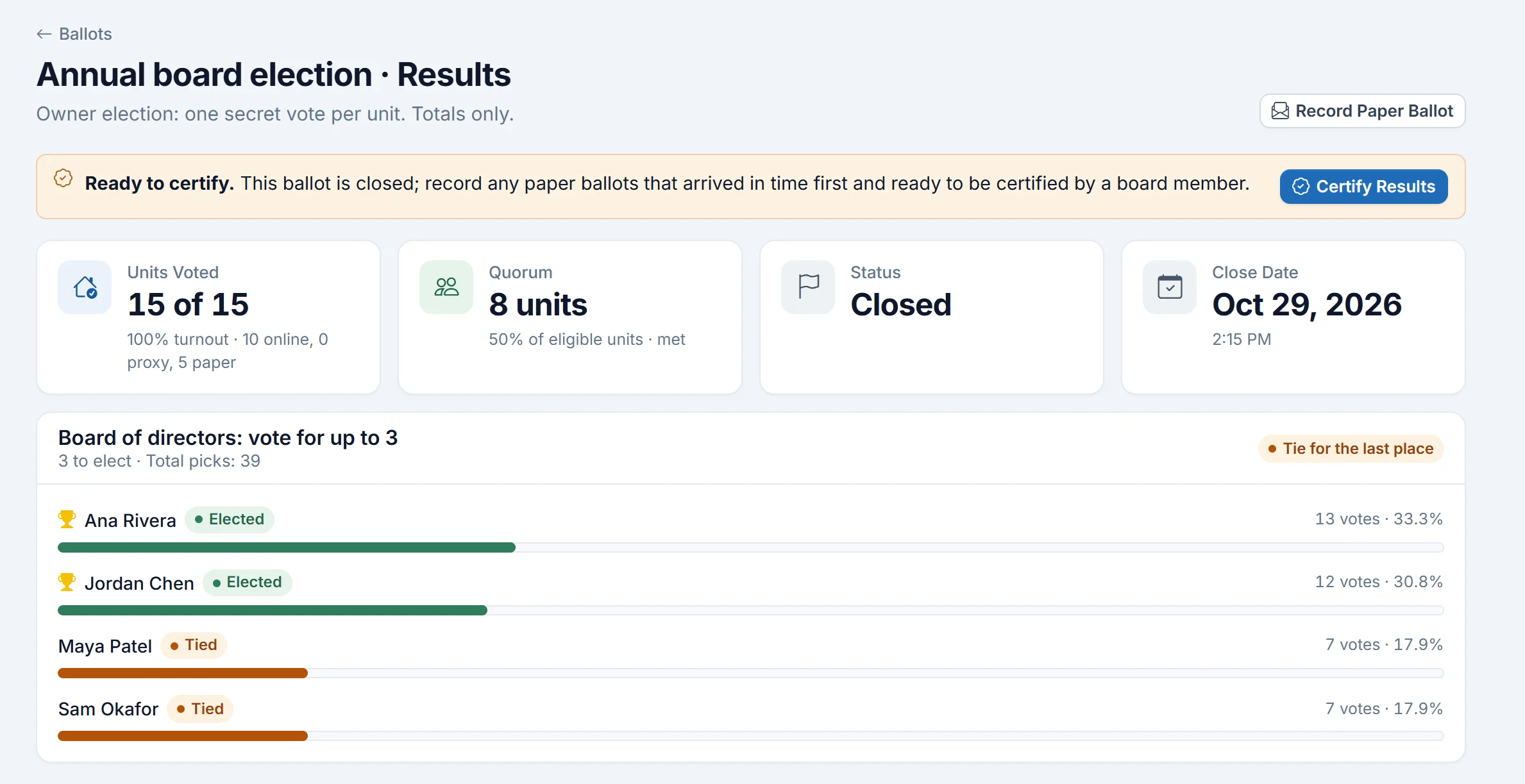
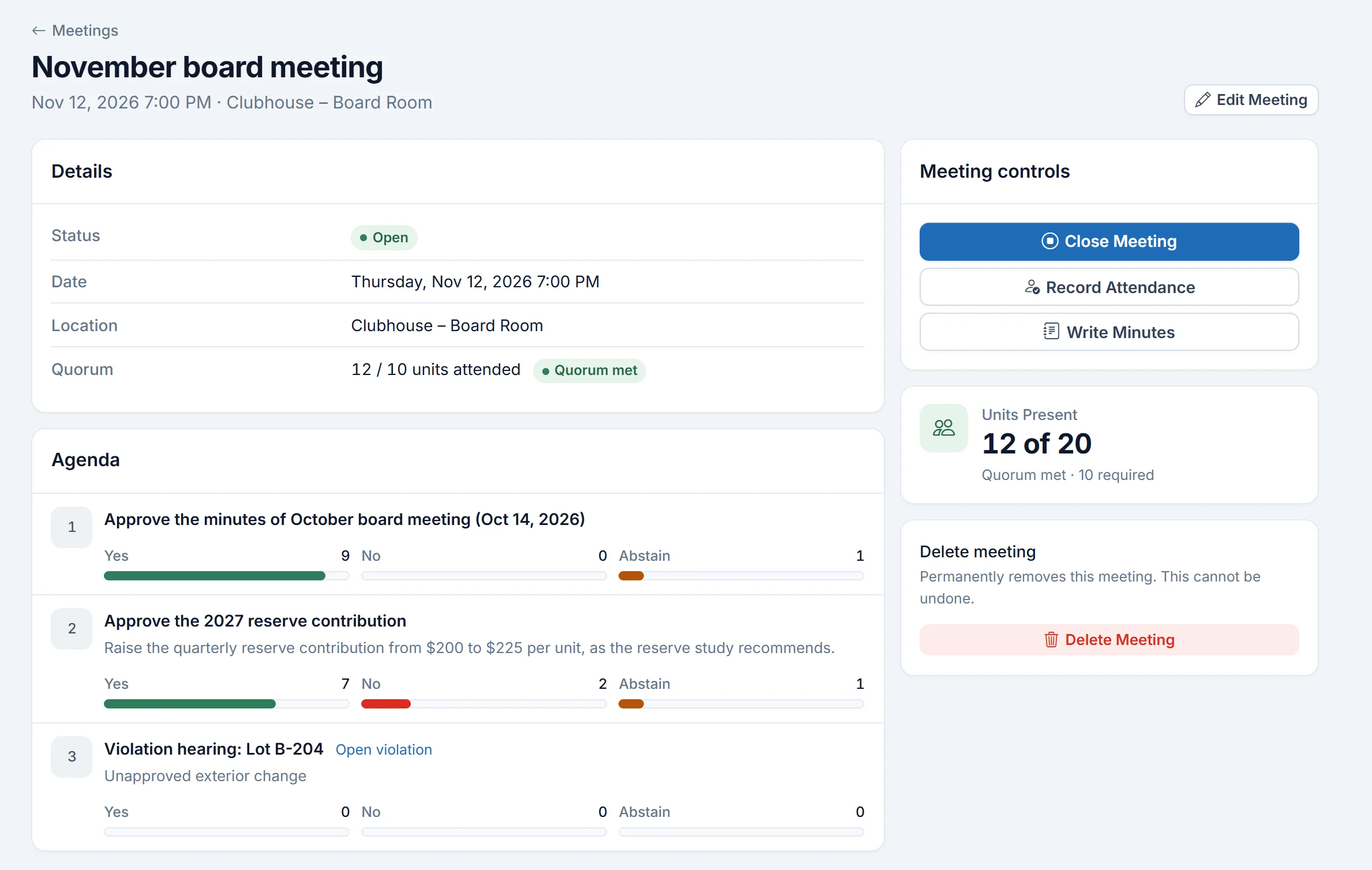
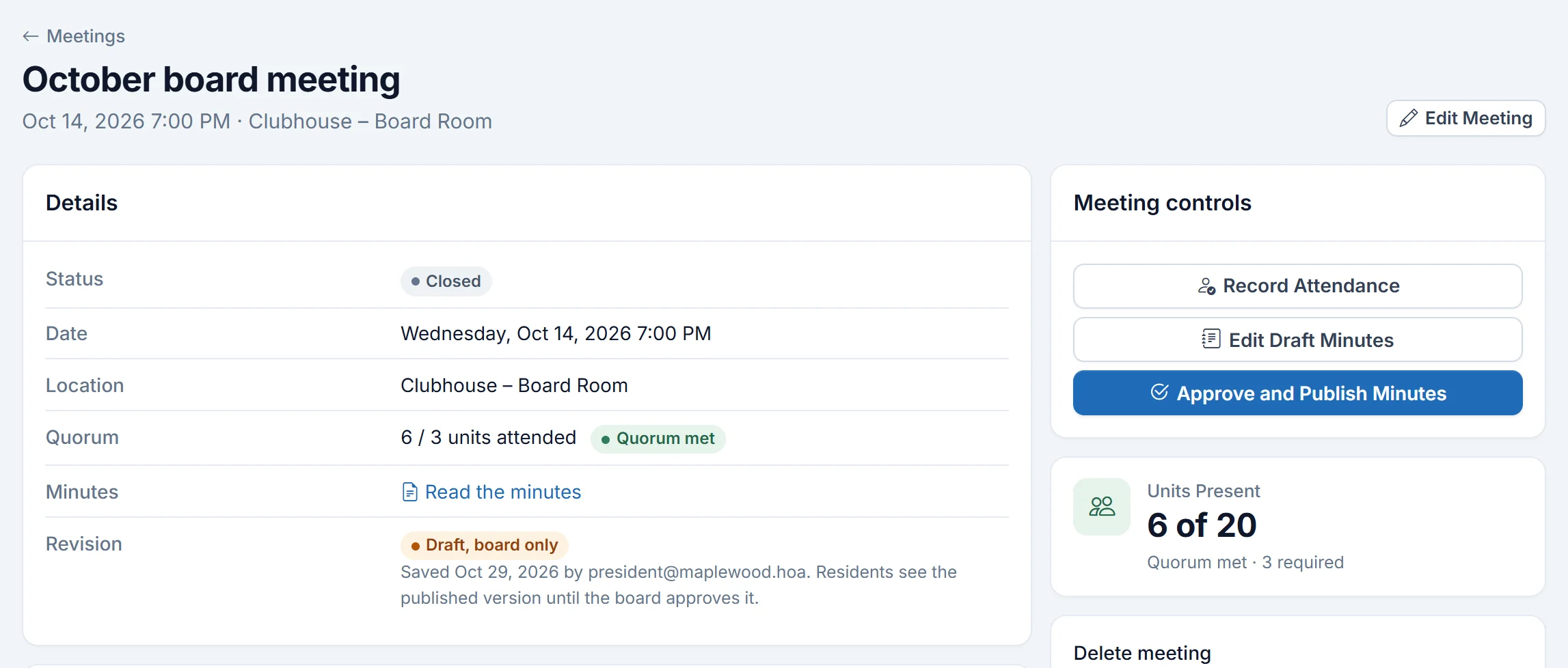
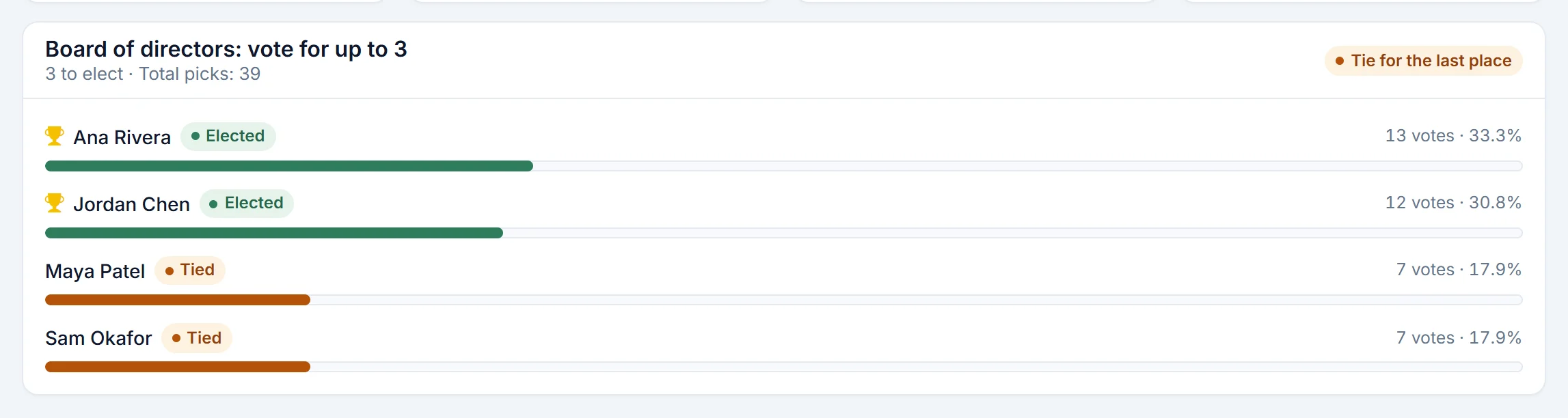
Real HOAOS screens with demo data; names and figures are made up.
Straight answers
What HOAOS doesn't do (yet).
If one of these is a must-have for your association, it's better you hear it here than at your annual meeting.
Video meetings
HOAOS doesn't host virtual meetings. Use your usual video tool and put the link in the meeting's location.
Automatic meeting notices
Scheduling a meeting or opening a ballot doesn't email owners by itself. Send the notice as an announcement or mass message. Surveys do have a built-in email.
Weighted voting
Every unit has one equal vote. HOAOS doesn't weight votes by percentage interest or unit size.
Self check-in and automatic quorum
The board records who attended, and sets the quorum. HOAOS doesn't read the quorum from your bylaws.
Is voting in HOAOS secret?+
Owner elections in HOAOS are secret. HOAOS records that a unit voted, and whether online, by proxy or on paper, separately from the answers, which carry no voter and only the day they were cast. Nobody, including the board, can see how a unit voted. Community ballots are not secret: each answer is kept with the voter for the audit record.
Can owners vote by proxy in HOAOS?+
Yes. In an HOAOS owner election, an owner can give a general proxy, where the holder votes as they choose, or a directed proxy, where the owner picks the answers and the holder only submits them. The proxy holder must be a signed-in member of the community. If the owner votes themselves or withdraws the proxy, an unused proxy is cancelled.
How does HOAOS track quorum?+
HOAOS tracks quorum in two places. At a meeting, the board sets a number of units and records attendance by unit, and HOAOS shows whether quorum is met. In an owner election, the board sets quorum as a percentage of eligible units, and the results and certificate show turnout against it.
Can residents see results before voting closes?+
No. In HOAOS, residents see ballot results only once voting closes, so running totals can't sway the vote. The board can follow results while a ballot is open. For surveys, the board chooses whether residents see totals as answers come in, after the survey closes, or never.
Can the board record paper ballots?+
Yes. A board member can enter a unit's paper ballot in an HOAOS owner election. It counts as that unit's one vote, so the unit can't also vote online or by proxy, and turnout shows how many units voted on paper.
Are meetings and voting included in every HOAOS plan?+
Yes. Meetings, minutes, owner elections, community ballots, surveys, announcements and the document library are included in every HOAOS plan. Plans differ only by community size: $50/mo up to 50 units, $95/mo up to 200 units and $195/mo up to 500 units. See HOAOS pricing.
More of HOAOS
Get started
Stop counting ballots by hand.
Set up your community in HOAOS and run your next meeting and election with agendas, quorum and secret voting in one place.