HOAOS Resident portal

An HOA resident portal for every homeowner.

The HOAOS resident portal gives each homeowner and tenant their own sign-in for their unit's balance, payments, requests and community news. Residents pay dues online, submit maintenance and architectural requests, follow violations on their unit, vote, and read announcements and documents. Residents see only their own unit, and the board invites them by email.

  • On every plan
  • Own unit only
  • Invited by the board

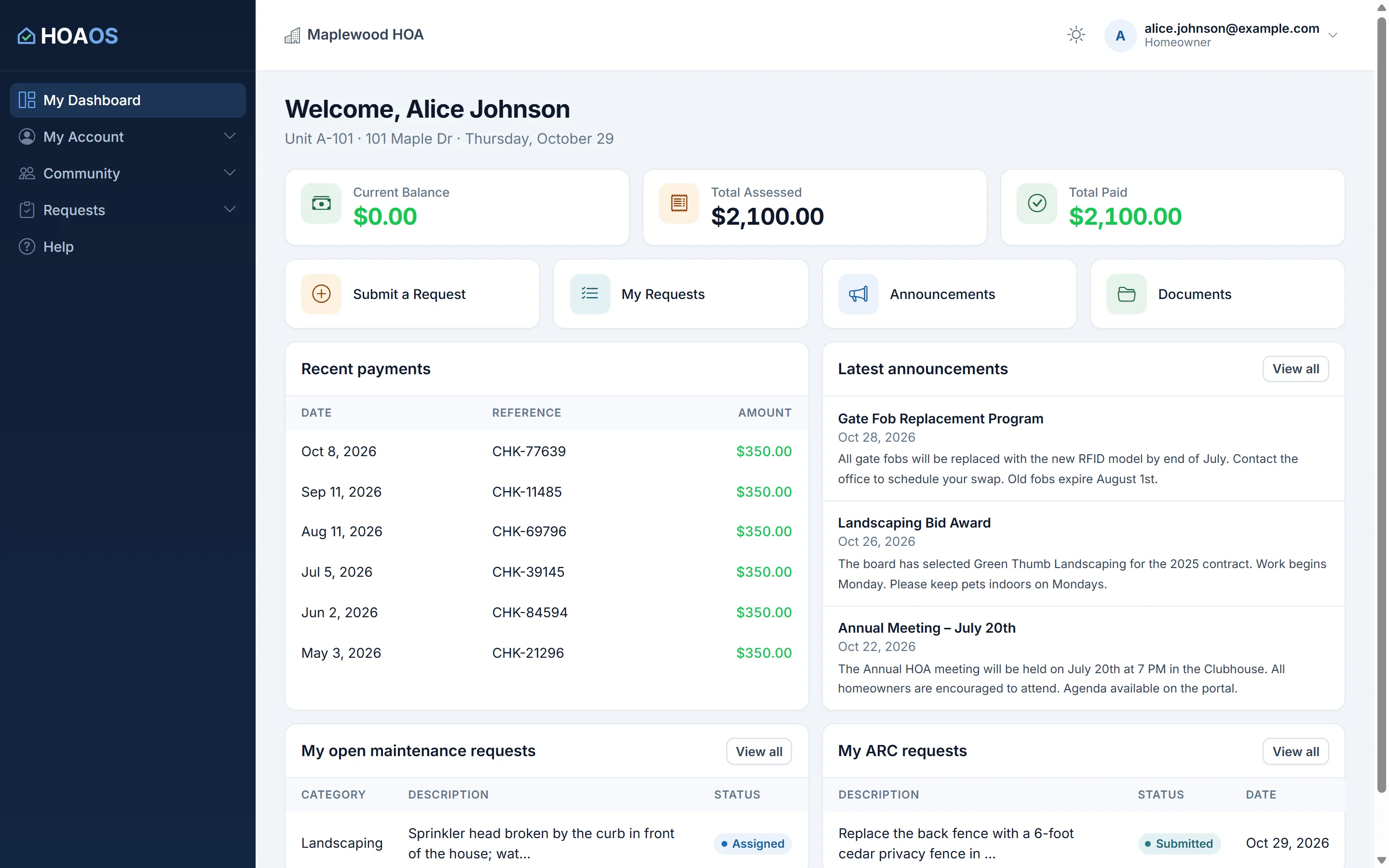
Example HOAOS resident dashboard for Lot 12: $1,350 assessed, $900 paid, $450 balance, shortcuts to requests, announcements and documents, and an architectural request under review.

Key facts

Who it's for
Homeowners and tenants in HOA and condo communities run on HOAOS, each with their own sign-in.
What residents do
See their balance and payments, pay dues, submit and follow requests, see violations on their unit, vote, take surveys, book amenities, and read announcements, documents and rules.
Access
By email invitation from the board (single-use link, valid 7 days). Residents see only the unit or units they live in.
Sign-in security
2-step sign-in with an authenticator app: optional for residents, required for board members and property managers.
Plans and fees
On every HOAOS plan, from $50/mo. Residents don't pay to use the portal; card payments can carry a service fee if the association passes card costs on.
Not included
An app-store mobile app, resident-to-resident messaging and a resident directory.

01 / Balance & dues

What does a homeowner see when they sign in?

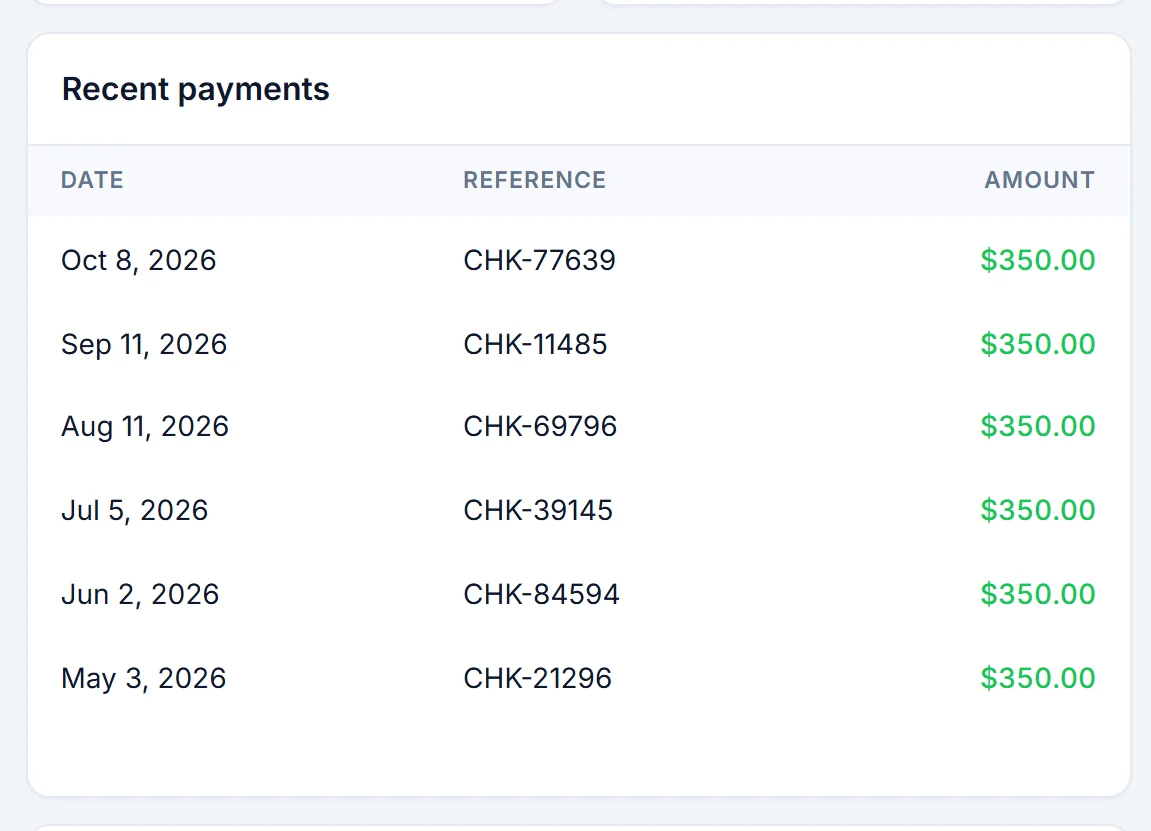
A homeowner lands on My Dashboard: what's been assessed on their unit, what they've paid, the balance, their recent payments, the latest announcements, and their open maintenance and architectural requests. Everything is for their own unit only.

Once the board connects the association's payment account, residents pay dues online by card or bank transfer and the money goes to the association, not to HOAOS. They can also turn on auto-pay from their bank account, read their monthly owner statements and see any special assessment on their unit. More on the money side is on HOA dues collection.

  • Balance that counts pending bank payments while they clear
  • Pay Dues by card or bank account, with the full balance filled in
  • Auto-pay enrollment, statements and special assessments
  • Works in a phone browser and can be added to the home screen

02 / Requests & violations

How do residents send the board a request?

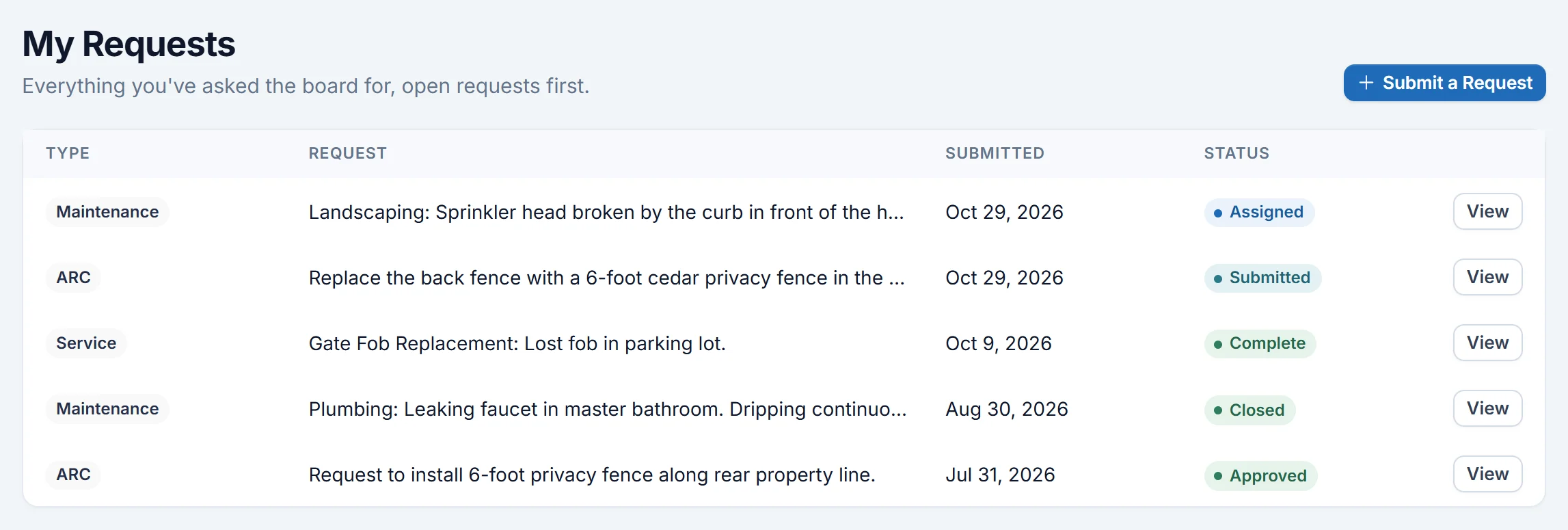
Every request starts from one Submit a Request page and is followed under My Requests. Residents can report maintenance, ask for an architectural change (ARC, architectural review), request a service such as a gate remote or parking permit when the board offers them, order a resale packet, or dispute a charge on their account.

An ARC request takes a description and an attachment, and tells the owner the date the board will decide by. The decision, approved, approved with conditions or denied with reasons, comes back as a letter they can open in the portal. Residents also see violations on their own unit, with the photos and the notice letters as sent.

  • Maintenance, ARC, service, resale and charge-dispute requests
  • One list of every request on the resident's units, with status
  • ARC decision letters and violation notices kept in the portal
  • The ARC committee's internal comments stay board-only

03 / Community life

What else is in the resident portal?

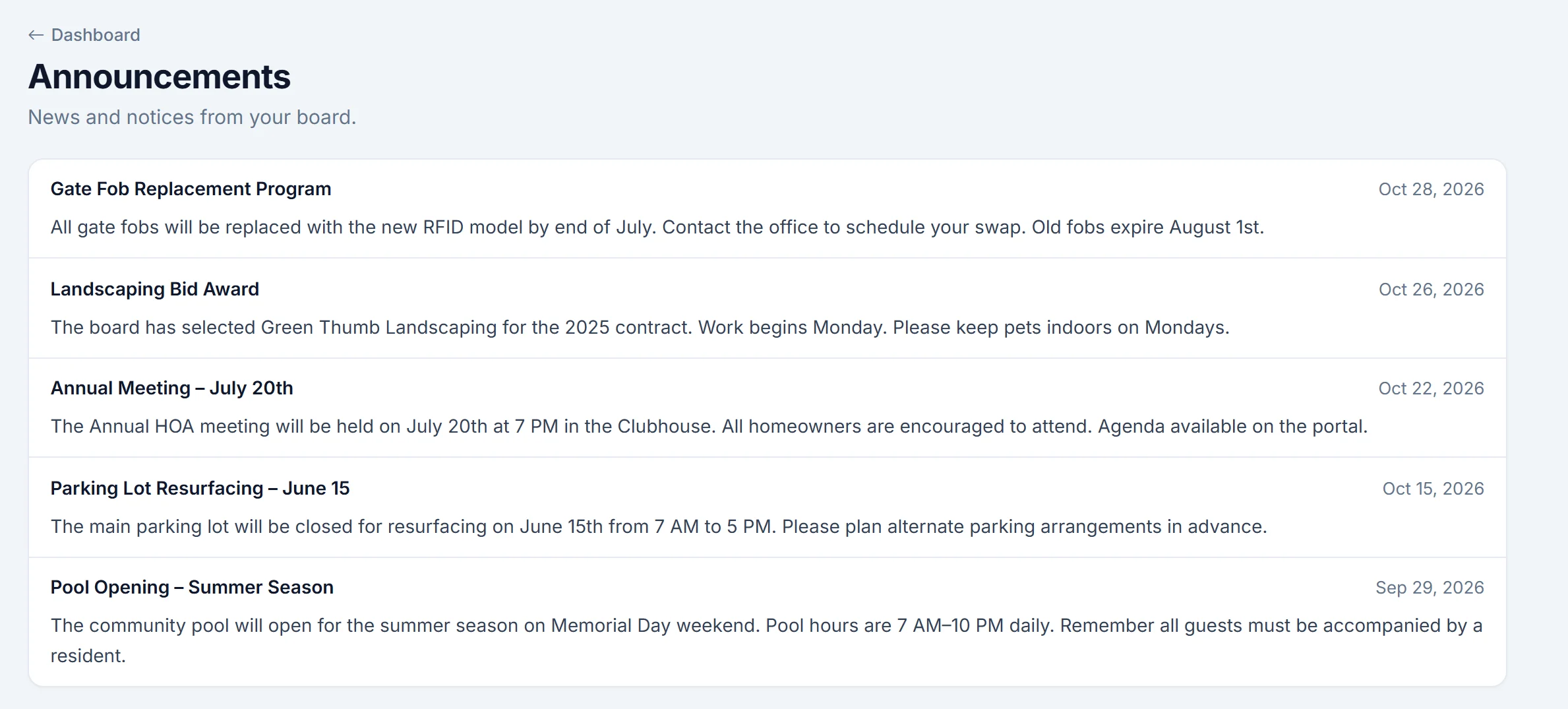
Residents read the board's announcements, download documents such as the CC&Rs, bylaws, approved minutes and forms, and read published annual disclosures. They see the community calendar, reserve amenities like the clubhouse, and search the community rules.

They take part in governance too: owners vote at meetings and in secret owner elections, members vote on community ballots, and everyone eligible answers surveys. The board directory lists the board, with a contact form that emails the member they pick. See HOA meetings and voting.

  • Announcements feed and document library by category
  • Community calendar and amenity reservations
  • Meetings, ballots and surveys in the same sign-in
  • Board directory with a contact form, and searchable rules

04 / Access, roles & privacy

Who can see what in HOAOS?

HOAOS has four roles. Board members and property managers run the community and see every unit. Homeowners and tenants use the resident portal and see only the units they currently live in: their balance, requests, violations and unit records, never a neighbor's. Each community's records are kept apart from every other community's.

Some things are for owners only: voting at meetings and in owner elections, owners-only surveys, and choosing how official notices arrive. Owners can agree to get official notices by email; otherwise those are mailed. Residents choose which emails they get, by topic, in Notification Settings.

  • 2-step sign-in required for the board, optional for residents
  • Recovery codes, and the board can reset a member's lost 2-step
  • Changing a password signs the account out everywhere
  • Board-only: draft minutes, ARC committee comments, written survey answers

Roles in HOAOS

Board member
Every unit and record2-step sign-in required
Property manager
Same access as the board2-step sign-in required
Homeowner
Own unit onlyVotes, owner surveys, notice settings
Tenant
Own unit onlyCommunity ballots, requests, documents

Residents never see another unit's balance, requests or violations.

How it works

How residents get into the HOAOS portal.

Residents don't sign themselves up. The board adds them and invites them, and each invitation is good for one use within 7 days.

  1. STEP 01

    Add units and residents

    Add each unit or lot and link its owners and tenants, by hand or with a CSV import of names, emails, phones and units.

  2. STEP 02

    Send invitations

    Preview everyone with an email and no account yet, and invite them all at once, or invite one person at a time.

  3. STEP 03

    Residents set a password

    Each resident gets an email with a single-use link that works for 7 days, and chooses their own password.

  4. STEP 04

    Residents sign in

    They land on My Dashboard with their own unit's balance, payments, announcements and open requests.

  5. STEP 05

    Optional 2-step sign-in

    Residents can add an authenticator app for a second step. Board members and property managers must.

For the boardComing soon

AI apps for the board

HOAOS includes a read-only connection that lets board members and property managers ask their own Claude about the community's to-do list, delinquencies, open violations and requests, upcoming meetings, documents and monthly finances. It isn't switched on yet. When it is, it stays off until the board turns it on, residents can't connect, it can't change anything, connecting needs a fresh password and 2-step code, and every read is in the audit log.
Inside HOAOS

See it in the app.

Real HOAOS screens, with demo data loaded.

Real HOAOS screens with demo data; names and figures are made up.

Straight answers

What HOAOS doesn't do (yet).

If one of these matters to your residents, it's better you hear it here than from them.

Not included

An app-store app

The portal runs in any phone or computer browser and can be added to a phone's home screen. There's no iOS or Android app to download.

Not included

Resident-to-resident messaging

There's no forum, chat or resident directory. Residents reach the board through requests or the board directory's contact form.

Requires

Online payments before setup

Residents can pay online only after the board connects the association's payment account. Until then they see their balance and pay the way they do today.

By design

Self sign-up

Residents can't create their own account. The board invites them, which keeps strangers out of your community's records.

FAQ

Resident portal questions.

Something else? Email us and a person will answer.

How do homeowners get access to the HOAOS resident portal?+

The board invites them. In HOAOS, the board can invite every resident who has an email address and no account yet in one go, or invite people one at a time. Each invitation is a single-use link that works for 7 days, and the resident uses it to set their own password.

Can residents see other units' balances or violations?+

No. In HOAOS, homeowners and tenants see only the units they currently live in: their own balance, payments, requests, violations and unit records. Only board members and property managers see every unit.

Can tenants use the HOAOS resident portal?+

Yes. Tenants get their own HOAOS sign-in for their unit and can submit requests, read announcements and documents, book amenities and vote on community ballots. Voting at meetings and in owner elections, owners-only surveys and official notice settings are for owners.

Is 2-step sign-in required?+

HOAOS requires 2-step sign-in with an authenticator app for board members and property managers, who can see every unit's records. For homeowners and tenants it's optional and can be turned on from their account. Recovery codes cover a lost phone, and the board can reset a member's 2-step sign-in.

Does the HOAOS resident portal work on phones?+

Yes. The HOAOS resident portal works in a phone's web browser and can be added to the home screen like an app. There is no separate app to download from an app store.

Can board members connect an AI app like Claude to HOAOS?+

Not yet. HOAOS has a read-only connection for board members' own Claude built, but it isn't switched on. When it launches, it stays off until the board turns it on, only board members and property managers can connect, residents are refused, and the AI app can read but never change anything.

Get started

Give every homeowner one place to go.

Set up your community in HOAOS, invite your residents by email, and let them check their balance, pay and send requests on their own.